Chapter 1: Fundamentals
This chapter begins with the basic development environment, then explores the core mechanics of the .NET runtime and the C# type system. We won’t dwell on basic control flow like if/else statements and loops; instead, we’ll dive straight into the foundational concepts you’ll need for the more advanced C# features covered later in this book.
1.1 The design philosophy
C# is fundamentally an object-oriented language that emphasizes encapsulation, inheritance, and polymorphism. However, starting with C# 3.0, it began incorporating many of the best ideas from functional programming:
| Functional feature | C# implementation |
|---|---|
| Functions as values | Delegates and lambda expressions |
| Declarative data processing | LINQ query expressions |
| Immutability | record, readonly struct, init accessors |
| Pattern matching | switch expressions, the is operator |
This exemplifies C#’s OOP + FP hybrid design, combining the organizational power of object-oriented programming with the declarative expressiveness of functional programming. Records, pattern matching, and LINQ all grow out of this philosophy.
Terminology
In programming languages, an expression is typically “a piece of code that can be evaluated and produces a value.” A statement, on the other hand, performs an action and usually does not directly produce a value.
Type safety: your first defense
C# is a strongly typed language with strict type rules:
- Static typing: A variable’s type is determined at compile time, allowing the compiler to catch type errors before the program ever runs.
- Strong typing: Risky implicit conversions are prohibited. For example, you can’t assign a
doubledirectly to anint; you must use an explicit cast.
This helps you catch errors earlier and reduces the chance of runtime failures. Many modern C# features, such as Nullable Reference Types, further reinforce this safety net.
The following code shows how C# blocks an implicit conversion that could lose information:
// The compiler prevents this unsafe operation.
double pi = 3.14159;
int rounded = pi;  // ✘ Compile-time error: cannot implicitly convert

int rounded2 = (int)pi;  // ✔ Explicit cast; you're choosing to truncate
In this example, the compiler is not forbidding the conversion outright; it requires you to make the potential loss of information explicit. That design keeps risky operations from happening quietly in your code.
In short: leverage the compiler to prevent bugs. Type safety, null safety, pattern matching, and record-based value equality all reduce surprises at runtime.
1.2 Quick start
This section walks you through creating a minimal .NET project and observing how it compiles and runs. We’ll start with the command-line interface (CLI) so you can understand the .NET project structure and build pipeline.
Required tools
Before you begin, install the .NET 11 SDK (or later). You can choose your preferred development tool: Visual Studio 2026 Community (a full-featured IDE), Visual Studio Code (lightweight and cross-platform), or JetBrains Rider.
Your first .NET project
Open a terminal and run the following commands to create and run a Console application:
dotnet new console --name HelloCSharp
cd HelloCSharp
dotnet run
The terminal will print:
Hello, World!The project directory contains two essential files:
HelloCSharp.csproj: The project file defining target frameworks and dependencies.Program.cs: The entry point, containing a single line of code by default:
// See https://aka.ms/new-console-template for more information
Console.WriteLine("Hello, World!");
Modern C# projects enable top-level statements by default. The compiler automatically synthesizes a Program class and Main method wrapper, eliminating the need for boilerplate code.
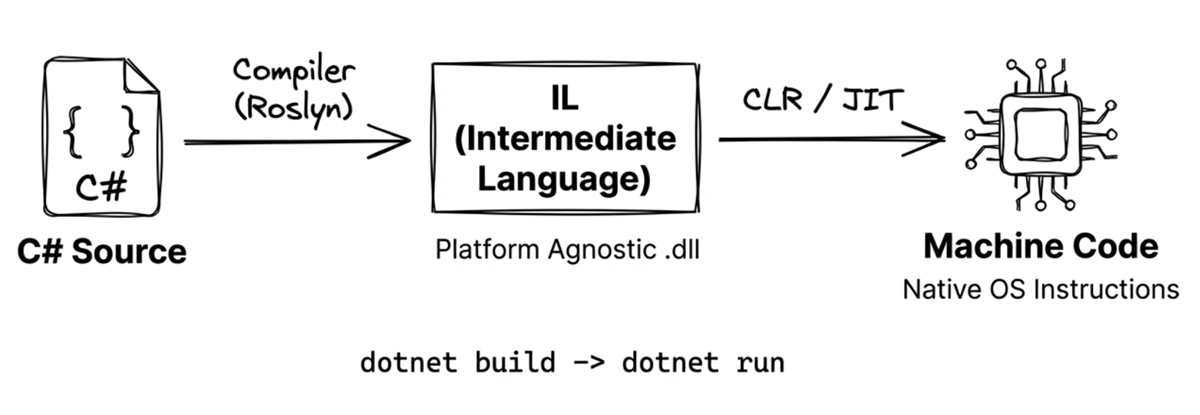
When you run dotnet run, the execution flow comprises three distinct stages behind the scenes:
dotnet new: Generates the project file (.csproj) and source file (Program.cs) from a template.dotnet build: Compiles C# source code into Intermediate Language (IL) and packages it into a.dllor.exe.dotnet run: Launches the .NET Runtime (CLR) to execute the compiled code.
What is IL (Intermediate Language)?
C# source code is usually not compiled directly into machine code for a specific CPU. Instead, it is first translated into IL (Intermediate Language). Because IL is independent of any particular CPU instruction set, the same compiled output can be executed by .NET runtimes across different platforms.
Under the standard JIT (Just-In-Time) execution model, the .NET Runtime compiles IL into platform-specific machine code dynamically as needed during program execution. Modern .NET also supports Native AOT, which compiles directly to native code ahead of time during publishing—another deployment model that doesn’t change our foundational understanding of JIT.
1.3 The .NET runtime architecture
When you type dotnet run, a sophisticated, layered system goes to work behind the scenes. .NET is designed to balance developer convenience with low-level performance control.
At a high level, the .NET runtime environment consists of three primary layers:
| Layer | Name | Responsibilities |
|---|---|---|
| Top | Application Layer | Application frameworks (ASP.NET, MAUI, WinUI, etc.) |
| Middle | BCL | Base Class Library (collections, I/O, networking, cryptography, etc.) |
| Bottom | CLR | Common Language Runtime (memory management, JIT compilation, exception handling) |
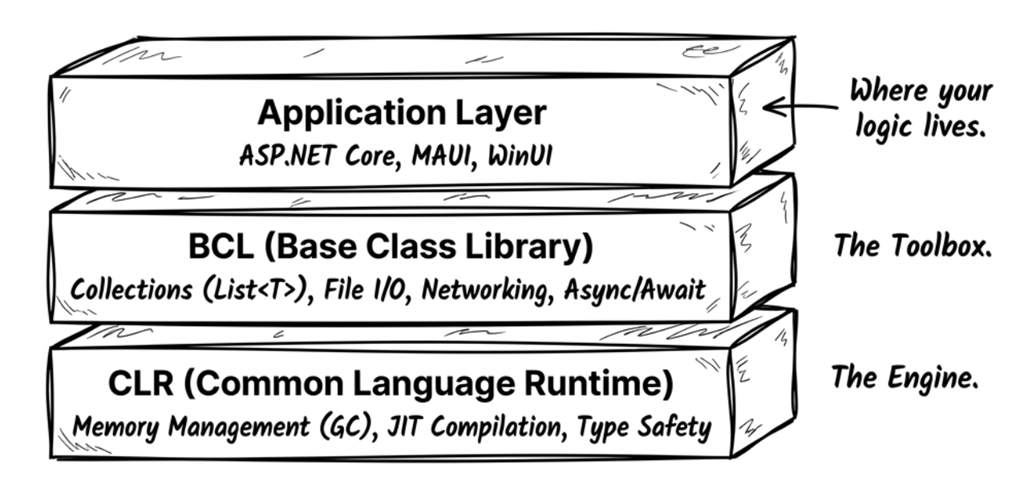
The CLR (Common Language Runtime) is the heart of .NET. It’s responsible for:
- Compiling IL into machine code in the usual JIT execution model
- Automatic memory management through the garbage collector (GC)
- Type-safety checks
- Exception handling
The GC tracks the objects a program can still access and reclaims the memory occupied by objects that are no longer reachable. Reclaiming memory takes time; the more objects a program allocates in a short period, the more frequently the GC typically needs to run. This additional overhead is called GC pressure.
The BCL (Base Class Library) provides the essential building blocks you’ll use constantly:
- Collections (
List<T>,Dictionary<TKey,TValue>) - String processing and regular expressions
- File I/O and networking
- Asynchronous programming (
async/await)
The Application Layer contains higher-level frameworks for specific app types:
- ASP.NET Core: web apps and APIs
- MAUI: cross-platform mobile and desktop apps
- WinUI / WPF: Windows desktop apps
Once you understand these layers, it becomes easier to see why the same C# code can run in different environments.
Cross-platform support
Modern .NET (starting with .NET 5) supports multiple platforms:
| Platform | Supported app types |
|---|---|
| Windows | Console, Web, desktop (WPF/WinUI), services |
| macOS | Console, Web, desktop (Mac Catalyst) |
| Linux | Console, Web, services |
| iOS / Android | Mobile apps (via MAUI) |
| Browser | WebAssembly (via Blazor) |
As long as you avoid coupling it to platform-specific APIs, your C# code can run on any of these platforms.
Beyond the execution environment, the next foundation that directly affects program behavior and performance is how memory is allocated.
1.4 Stack and heap
Writing high-performance, bug-free code requires a solid understanding of memory allocation. The two foundational concepts here are the stack and the heap.
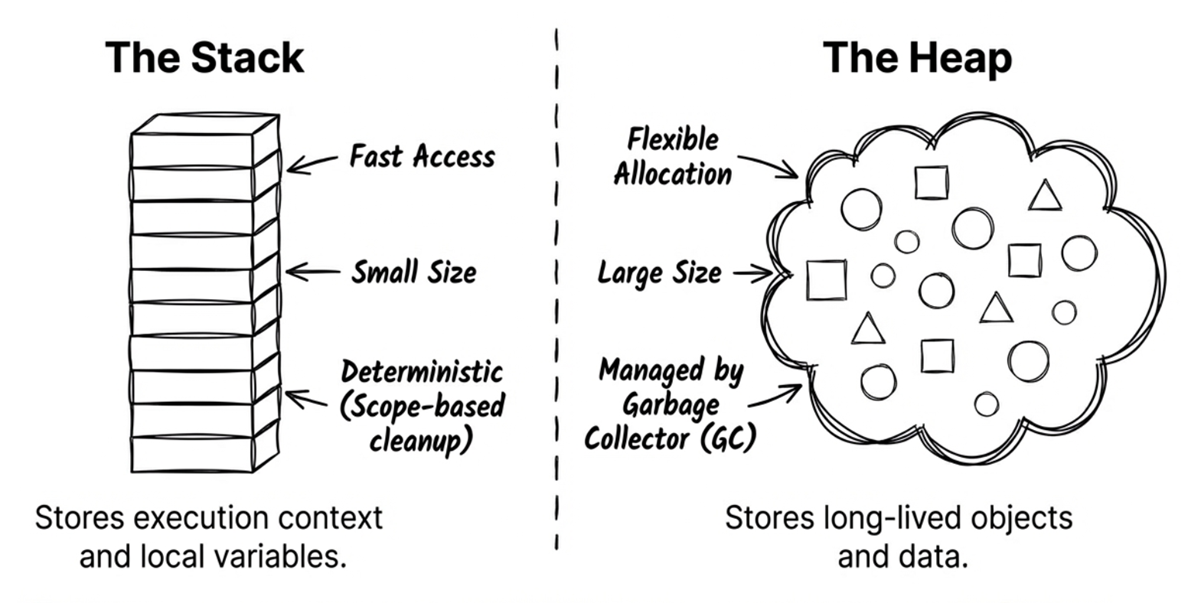
The stack and heap are both memory regions used while a program runs. Their most important difference is not simply which one is “faster,” but how memory is allocated and how its lifetime is managed.
Here is a simplified way to picture them:
- Think of the stack as a stack of work trays used for method calls. Each method call adds a new stack frame to the top; when the method returns, that top frame is removed.
- Think of the managed heap as an object store managed by the garbage collector (GC). An object does not disappear just because a particular method returns. It remains alive as long as the program can still reach it.
This analogy is about lifetime, not about the stack always being fast and the heap always being slow. Let’s now look at their characteristics separately.
The stack
The stack has several important characteristics:
- A well-defined lifetime: A stack frame is created for a method call and released when that method returns.
- Simple allocation: Creating or removing a stack frame generally requires only adjusting the stack’s current position, so the cost is low.
- Limited space: Each thread has a limited amount of stack space. Excessive recursion or allocating too much stack space can cause a
StackOverflowException.
Note
“The stack is closely tied to method calls” is a useful basic model, but it does not mean that every local variable must live on the stack. The compiler and JIT may keep data in registers or arrange for different storage because of a closure or an
asyncstate machine.
The heap
The managed heap has several important characteristics:
- Lifetime determined by reachability: An object’s lifetime is not limited to a single method call. It remains alive as long as the program can still reach it, which supports data that must be shared across methods or retained for longer periods.
- Usually more available space: Compared with the limited stack assigned to each thread, the managed heap can generally accommodate larger objects and data structures whose capacity grows dynamically.
- GC management: Objects on the heap normally carry extra information such as object headers, and the GC must later track, scan, and reclaim them. Modern .NET heavily optimizes ordinary small-object allocation, but frequent or large allocations still add management cost and create GC pressure.
For these reasons, it is misleading to reduce the distinction to “the stack is fast and the heap is slow.” Nor can you determine where data must live simply from how large it is or how long it survives. As the next section shows, type semantics and physical memory placement are related concepts, but they are not the same thing.
1.5 Value types and reference types
As mentioned earlier, C# programs run on top of the CLR (Common Language Runtime). The CLR has many responsibilities, including memory management, exception handling, and enforcing safety mechanisms. You don’t need to master all the CLR internals right away. For now, just keep these two primary jobs in mind:
- Managing type information
- Allocating and reclaiming memory (garbage collection)
When allocating memory, the CLR decides how data is laid out based on type characteristics, usage patterns, and runtime optimizations. Whether a type is a value type or a reference type is an important part of the story, but it is not the only factor that determines whether data ends up on the stack or the heap.
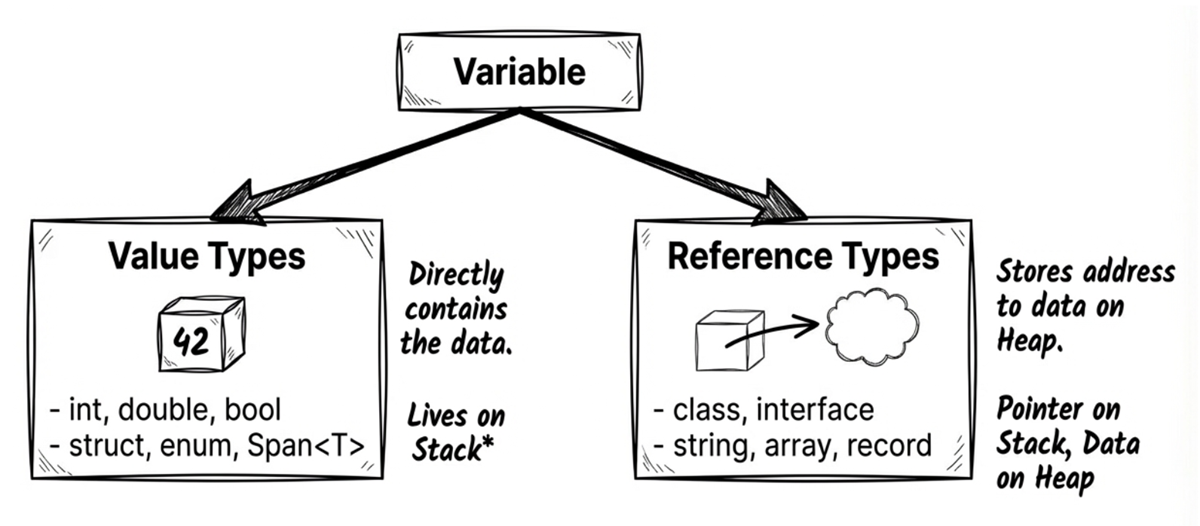
Value types
Value types include:
- All numeric types (
int,double,byte,decimal, …) bool,charenumstruct(includingDateTime,Guid,Span<T>)
Note:
Span<T>is aref struct. This is a special stack-only struct: theSpan<T>value itself cannot escape to the heap, so it cannot be boxed or used as a field in aclass. However, the data it represents is not necessarily on the stack; it may refer to a slice of a heap array or to other memory regions. See Section 13.2 of Chapter 13 “High-performance memory operations” for details.
Behavioral characteristics:
- They contain the data directly.
- Assigning one to another variable copies the entire value (copy by value).
Think of it like photocopying a physical document. If you hand a copy to a coworker (assignment), and they write on their copy (mutating their variable), your original document remains unaltered.
The following example demonstrates this value-type behavior: assignment copies the value itself.
int a = 10;
int b = a;  // Copies 10 into b
b = 99;     // Changing b does not affect a
Console.WriteLine(a); // Prints 10
Line 3 changes b, but a remains unchanged because int is a value type.
Source code: DemoValueTypes
Reference types
Reference types include:
class(includingstring,object, and arrays such asint[])interfacedelegate(delegates and lambdas are covered in Chapter 8, and events in Chapter 9)record(a reference type by default; see Chapter 4)
Note
Although
stringis a reference type, it is immutable, so in practice it often behaves similarly to a value type. In terms of type classification, however, it is still a reference type.
Behavioral characteristics:
- They store a reference (a memory address) that points to an object on the heap.
- Assigning one to another variable copies only the reference, resulting in both variables pointing to the same object.
It’s like sharing a link to a cloud document. You send your coworker the link (assignment). Both of you hold a copy of the link (the reference), and both copies point to the exact same online document (the object). If your coworker edits the document through their link, you’ll instantly see those changes.
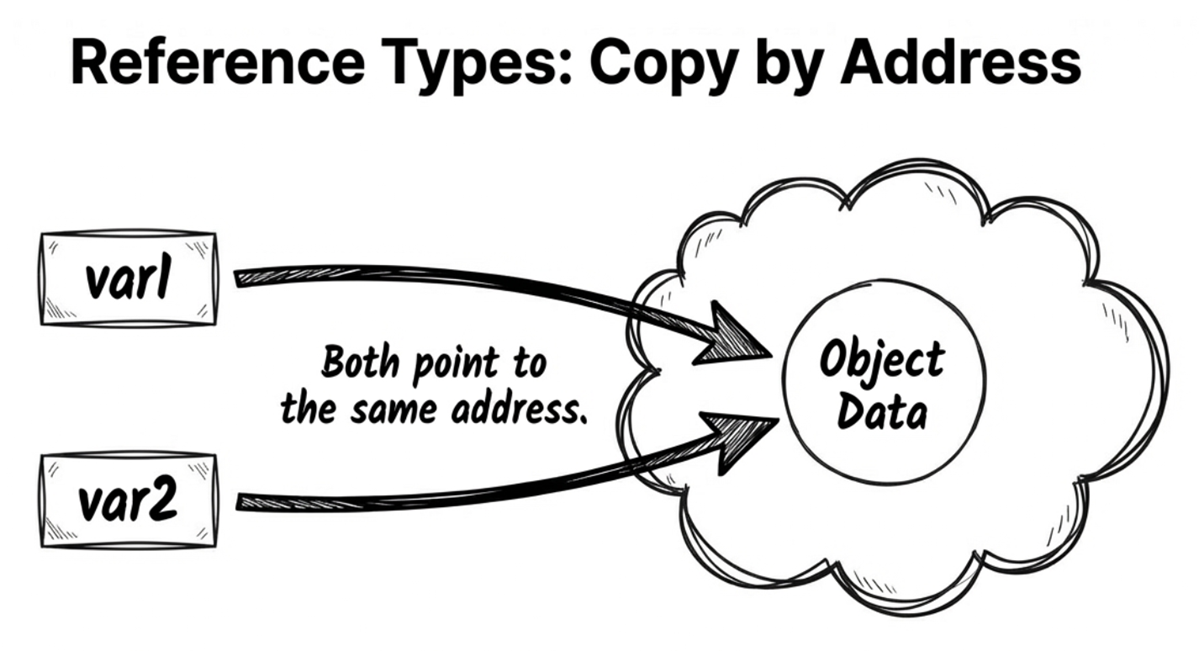
With reference types, assignment behaves differently. In the following example, user2 receives a reference to the same object:
var user1 = new User { Name = "Alice" };
var user2 = user1;   // Copies the reference; user1 and user2 point to the same object
user2.Name = "Bob";  // Changing user2 affects user1
Console.WriteLine(user1.Name); // Prints Bob
Therefore, when you modify Name through user2, user1 sees the modified state of that same object.
Source code: DemoReferenceTypes
Ask AI: common type gotchas
Many subtle bugs stem from misunderstandings about these type categories, which is also why technical interviewers love this topic. Try running the following prompt through your AI assistant to check your understanding:
Prompt
In C#, is
int[](an array of integers) a value type or a reference type? If it’s a reference type, but it containsintelements (value types), where are thoseintvalues stored—on the stack or on the heap? Explain the underlying memory layout.
Depending on the AI tool you use, answers may vary slightly. Here’s a simplified example answer:
AI Answer
int[]is an array, and arrays are reference types. Therefore, the entire array object (including all itsintelements) is stored on the heap, even thoughintitself is a value type.
Array layout: value vs reference elements
Many developers assume that an array is always a contiguous block of memory, but this is only partially true.
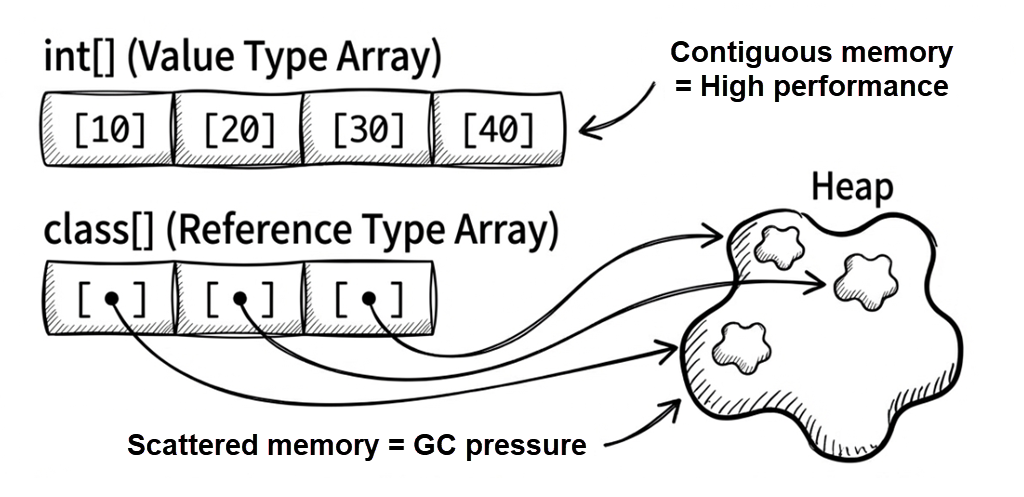
The underlying memory layout depends heavily on whether the element type is a value type or a reference type. This difference can affect performance (CPU cache locality) and garbage collection (GC) pressure. Next, let’s look at both cases from a memory-allocation perspective.
Arrays of value-type elements
Consider this example:
long[] numbers = new long[3]; // Each long is 8 bytes
numbers[0] = 12345;
numbers[1] = 54321;
numbers[2] = 99999;
In the usual allocation model, the runtime obtains one contiguous block of memory for the array, and the three long values are stored directly within it. An array object like this is normally allocated on the managed heap. Concretely:
- Array header: Includes metadata such as the array length.
- Contents: Stores the raw values (like
12345) packed tightly. - Result: Conceptually, there is a single array object; the data is dense and usually has good memory locality.
An analogy: A row of gym lockers. You open locker #0, and your item (the value) is right there. Open locker #1, and the next item is immediately next to it.
Arrays of reference-type elements
Next, consider an array whose element type is StringBuilder:
StringBuilder[] builders = new StringBuilder[3];
builders[0] = new StringBuilder("builder1");
builders[1] = new StringBuilder("builder2");
builders[2] = new StringBuilder("builder3");
In this scenario, the array stores references, not the actual string data:
- Array header: Includes metadata such as length.
- Contents: Stores references (addresses) to
StringBuilderobjects. - Actual objects: Usually allocated separately; they are not guaranteed to be contiguous with the array elements.
- Result: There are normally multiple allocations—the array itself and each
StringBuilderobject—and data locality may be poorer.
An analogy: A row of post office boxes. Box #0 contains a slip (a reference) that tells you where a package is stored. If the slips point to many different locations, the processor is less able to take full advantage of its caches, so performance may be worse than when the data is stored directly and contiguously.
This leads to two important effects:
- Locality: value-type arrays store elements contiguously, so CPU cache hit rates tend to be higher.
- GC pressure: reference-type arrays often create many scattered objects, increasing garbage collector work.
Key takeaways for this section:
- Whether you’re using a value type or a reference type, data still has to live somewhere in memory.
- Call-related data and many locals are often represented in a stack frame or in registers, but that is ultimately a runtime/JIT implementation detail.
- The key property of a value type is that it stores its data directly; that data may appear in a local, inside a heap object, or inside an array element.
- A reference-type variable stores a reference; the object it points to is typically allocated on the heap.
1.6 Boxing and unboxing
Boxing and unboxing are mechanisms that allow value types to be treated as objects, but they come with additional performance costs.
Boxing
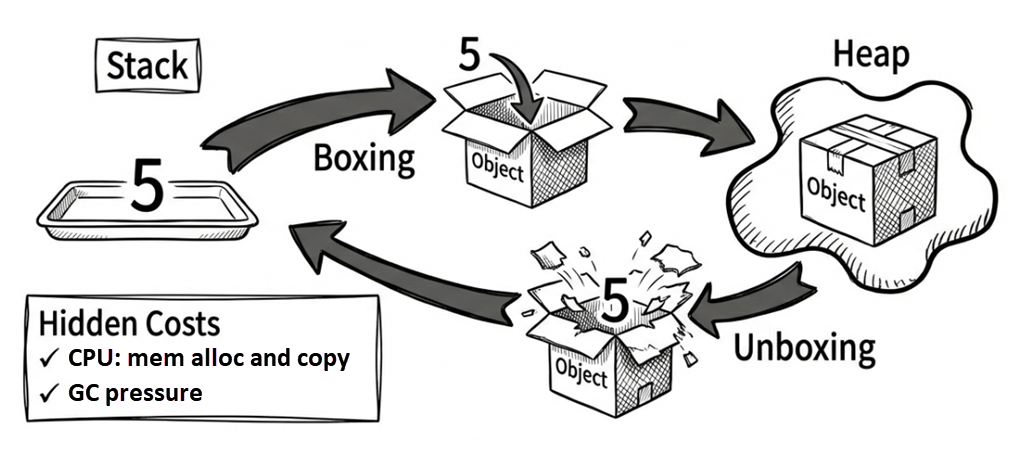
Boxing is the process of converting a value type into an object (a reference type).
Imagine picking an apple (a value type). Normally, you use it directly as a raw value. But if you now want to treat it as a general-purpose object stored in a warehouse (the heap), you must place it inside a physical box (boxing) and slap a tracking label on it. Procuring the box and packing the item introduces overhead.
During boxing, the CLR allocates memory on the heap and copies the value-type data into it. This is necessary because object is a reference type that requires a heap address, whereas a value type like int has no heap address on its own. Boxing creates a heap-allocated wrapper so the value can participate in reference-type semantics.
First, here is a minimal boxing example:
int i = 123;
object o = i; // Boxing: wraps the int in a heap-allocated object
Here, o is a reference that points to a newly created boxed int object on the heap.
Unboxing
Unboxing is the reverse process: converting an object back into a value type.
Unboxing involves verifying that the object contains the expected value type, then copying the value from the heap back to the stack.
When unboxing, you must explicitly specify the value type you want to retrieve:
int j = (int)o; // UnboxingIf o does not actually contain an int, this line throws an exception at runtime.
Why it matters
Boxing has two main costs:
- CPU work: Copying data and allocating memory.
- GC pressure: Boxing creates extra heap objects, giving the garbage collector more work.
Hidden boxing traps often occur when using older, non-generic collections (like ArrayList) or certain string formatting methods. Because ArrayList stores every element as object, adding a value type automatically triggers boxing. Here’s a common example:
int x = 10;
// Trap: string.Format takes object parameters
string s = string.Format("Score: {0}", x); // x gets boxed!

// Modern approach: string interpolation (often optimized by the compiler)
string s2 = $"Score: {x}";
Source code: DemoBoxingUnboxing
Whether string interpolation causes boxing depends heavily on your compiler version and the specific code. In modern C# and .NET, interpolating value types (like int) is highly optimized and typically avoids falling back to the boxing string.Format(object, ...) path, though you may still incur string allocations.
If you have heavy string formatting on a performance-critical hot path, more reliable optimization approaches include:
- Avoid APIs that primarily take
objectparameters (for example, someparams object[]overloads). - Prefer formatting APIs that can write into buffers, such as
TryFormatwithSpan<char>, to reduce temporary string allocations (see Chapter 13). - For collections, prefer generic collections—for example, use
List<int>instead ofArrayList.
- String interpolation is introduced in Chapter 2 (Section 2.7).
- Generics are covered in Chapter 9.
1.7 Copying objects and arrays
When copying objects or arrays, it’s crucial to understand the difference between a shallow copy and a deep copy. C# does not provide a universal built-in deep-copy mechanism. Because this topic is closely tied to value and reference types, it is an important part of understanding memory behavior.
Shallow vs deep copy for objects
A shallow copy copies only the top-level object itself. If that object contains reference-type fields, those fields will still point to the exact same inner objects:
class Team
{
    public string Name { get; set; } = string.Empty;
    public List<string> Members { get; set; } = new();

    // Uses object.MemberwiseClone() to copy members one by one (shallow copy)
    public Team ShallowCopy() => (Team)MemberwiseClone();
}

var team1 = new Team
{
    Name = "Dev",
    Members = new List<string> { "Alice", "Bob" }
};

var team2 = team1.ShallowCopy(); // Shallow copy
team2.Name = "QA";               // team2 has its own Name value
team2.Members.Add("Charlie");    // But Members still points to the same List!

Console.WriteLine(team1.Members.Count); // Prints 3 (affected!)
This demonstrates a classic shallow-copy bug: the internal List is not duplicated; only the reference to it is. As a result, adding an element to team2.Members inadvertently mutates team1.Members.
Source code: DemoShallowCopy
Early .NET provided the ICloneable interface, but its Clone() method returns object (lacking strong typing) and carries ambiguous semantics—one cannot tell from the interface whether it performs a shallow or deep copy. In practice, avoid relying on it as a public contract; use explicitly named methods (like ShallowCopy) or strongly typed copy constructors instead.
Note
Another common modern approach is using
recordtypes with thewithexpression (Chapter 4). Remember thatwithperforms a shallow copy by default; if members contain mutable nested reference types, internal objects are still shared across copies.
If you need to provide a deep copy, you must explicitly decide which members require new instances. The following example demonstrates implementing deep copy with a copy constructor:
class Team
{
    public string Name { get; set; }
    public List<string> Members { get; set; }

    public Team() { }

    public Team(Team original)
    {
        // string is immutable, so copying its reference directly is completely safe.
        Name = original.Name;

        // Create a new List to prevent sharing the Members collection with the original object.
        Members = new List<string>(original.Members);
    }
}

var team1 = new Team
{
    Name = "Dev",
    Members = new List<string> { "Alice", "Bob" }
};

var team2 = new Team(team1);  // Create an object copy using the copy constructor
team2.Members.Add("Charlie");
Console.WriteLine(team1.Members.Count); // Prints 2 (team1 is unaffected)
The key line is:
Members = new List<string>(original.Members);Because the elements are immutable string instances, copying their references is sufficient.
Source code: DemoDeepCopy
In this example:
- The
Nameproperty reuses the originalstringreference without issue. Becausestringis immutable, any modification (such asReplaceorToUpper) always produces a new string instance. Conversely,Membersis aList<string>(a mutable collection), which must be instantiated afresh to avoid shared state. - Copy constructors are particularly well-suited when you need fine-grained control over copy logic. They provide strong typing and represent the standard approach for custom cloning in .NET.
Note
For in-depth discussion on immutability, see Chapter 4: Immutable Design.
Summary of common object copying approaches and their trade-offs:
- Copy constructor: Strongly typed with explicit logic, offering fine-grained control over shallow and deep copy boundaries; requires maintaining boilerplate when types have many members.
recordwithwith: Clean and concise, ideal for non-destructive mutation of immutable data, but performs a shallow copy by nature (Chapter 4).- JSON serialization / deserialization:
System.Text.Jsoncan duplicate entire object graphs automatically, serving as a convenient fallback; however, it depends on public serialization contracts, type support, and circular-reference configurations, carrying extra performance overhead. It is not an unconditional universal deep copy. ICloneable.Clone(): Weakly typed with ambiguous semantics; avoid in modern code.
Ask AI
Use the following prompt to further compare the use cases and limitations of these two deep-copy approaches:
In C#, when a class contains nested mutable collections and objects, what are the respective use cases and limitations of using a “copy constructor” versus “serialization (System.Text.Json)” for deep copying? Please illustrate the issues encountered with circular references and private members during serialization.
Shallow vs deep copy for arrays
Array copying follows the same principle as object copying: Array.Clone() performs a shallow copy.
If the array element type itself does not contain mutable reference state, such as int or string, a shallow copy is often enough. The following example copies an int[]:
int[] original = { 1, 2, 3 };
int[] copy = (int[])original.Clone();
copy[0] = 999;
Console.WriteLine(original[0]); // Prints 1 (unaffected)
Be careful, though: this works because int is just the value itself. If the array element type is a struct that contains reference-type fields, Array.Clone() still performs only a shallow copy of those inner references, so it does not automatically give you full isolation.
If the array elements are reference types, be careful:
var original = new StringBuilder[]
{
    new StringBuilder("A"),
    new StringBuilder("B")
};
var copy = (StringBuilder[])original.Clone();
copy[0].Append("!"); // Mutating copy also mutates original!
Console.WriteLine(original[0]); // Prints "A!" (affected!)
The output is A!. Although Array.Clone() creates a new array object, the elements inside still point to the same StringBuilder objects as original, so mutating copy[0] also affects original[0].
To create a deep copy, you must copy each element individually:
var original = new StringBuilder[]
{
    new StringBuilder("A"),
    new StringBuilder("B")
};

var deepCopy = new StringBuilder[original.Length];
for (int i = 0; i < original.Length; i++)
{
    deepCopy[i] = new StringBuilder(original[i].ToString());
}
deepCopy[0].Append("!");
Console.WriteLine(original[0]); // Prints "A" (unaffected)
This time the output is A, showing that deepCopy and original are two independent arrays.
Source code: DemoDeepCopyArray
Summary
- C# design philosophy: An OOP + FP hybrid with strong type safety that lets the compiler help prevent potential bugs.
- Execution model: A typical .NET build first compiles C# source code into IL. In the usual JIT execution model, the CLR compiles that IL into machine code at runtime and handles runtime services such as garbage collection.
- Stack vs heap: A stack frame’s lifetime is tied to a method call, while the managed heap uses reachability and the GC to manage object lifetimes. The distinction should not be reduced to “stack fast, heap slow.”
- Value types vs reference types: Value types contain data directly, while reference types store references to objects; you can think of a reference as a memory address that points to an object.
- Array memory characteristics: Value-type arrays allocate elements contiguously (typically offering better cache locality); reference-type arrays store scattered references (which can increase GC pressure).
- Boxing/unboxing: Boxing converts a value type to
object; unboxing extracts the boxed value back to its original value type. Both can introduce extra cost. - Object copying: C# provides shallow copy only; deep copy requires manual work or serialization (for example,
System.Text.Json).
Glossary
| Term | Description |
|---|---|
| BCL | Base Class Library; collections, I/O, networking, and other fundamental APIs |
| Boxing | Converting a value type into an object |
| CLI (command line interface) | A text-based interface for interacting with the computer |
| CLR | Executes .NET code and manages memory; in the JIT execution model, it also compiles IL into machine code |
| GC (garbage collector) | Automatically manages and reclaims heap memory |
| Heap | Memory region where objects live; managed by the GC |
| IL (intermediate language) | Platform-independent compiled output for .NET languages |
| Immutable | Cannot be changed after creation (for example, string) |
| JIT (Just-In-Time compilation) | Compiles IL to machine code at runtime |
| Reference type | Stores a reference/address to an object (for example, class, string) |
| Stack | Memory region whose call frames are created and released along with method calls |
| Top-level statements | Write statements without explicitly defining a Program class |
| Unboxing | Converting an object back into a value type |
| Value type | Stores data directly (for example, int, struct) |