Chapter 7: Generics
Bruce: “Robin, why do you have so many custom collection classes? Things like
EmployeeList,CustomerList,VendorList… do they have special behavior?”Robin: “Not really. Back when we used
ArrayListto store these objects, every read needed a bunch of casts. To avoid manual casting, I made separate list classes for employees, customers, and vendors. It took time up front, but the payoff was compile-time type safety, no manual casting, and cleaner code.”Bruce: “Fair. But… have you considered generics?”
This chapter explores C# generics. Generics are an important abstraction in modern C#, letting you write type-safe, reusable code while avoiding unnecessary performance costs and runtime cast errors. They also align well with the DRY principle (Don’t Repeat Yourself).
7.1 Why do we need generics?
The essence of generics is parameterized types: abstracting the type itself into a parameter so that the same logic can safely apply to diverse data types without duplicating classes or relying on casting from object.
The dilemma without generics: type safety and boxing costs
Before generics, general-purpose collections stored elements as object (such as ArrayList in early .NET):
ArrayList list = new ArrayList();
list.Add(100);       // int is boxed to object
list.Add("Hello");   // String added; compiler does not prevent this

int val = (int)list[0];      // Requires explicit manual cast
DateTime dt = (DateTime)list[1]; // Compiles, but throws InvalidCastException at runtime!
This approach suffered from two major flaws:
- Loss of compile-time type safety: Any type can be placed into the collection; type mismatches are discovered only when the program crashes at runtime.
- Performance and memory overhead: When storing value types like
int, every insert requires boxing onto the heap, and every read requires unboxing, creating significant GC pressure and CPU overhead with large data sets.
To achieve type safety, early developers had to manually duplicate dedicated collection classes for each type (like IntList, StringList), violating the DRY (Don’t Repeat Yourself) principle and dramatically raising maintenance costs.
The generic solution: compile-time contracts and type specialization
Generics resolve this dilemma elegantly. By placing angle brackets <T> after the type name, the decision of which type to use is delegated to the caller:
List<int> numbers = new List<int>();
numbers.Add(100);  // Stores int directly, zero boxing cost
// numbers.Add("Hello"); // ✔ Compile error immediately, safeguarding type safety

int num = numbers[0]; // No manual cast required
With generic collections: - The compiler guards safety: Incompatible types are rejected at compile time, eliminating runtime casting failures. - Boxing overhead is eliminated: The .NET CLR performs JIT specialization for value types, storing native values contiguously in memory. - Code reuse: A single List<T> satisfies list requirements for all types.
Source code: DemoWhyGenerics
7.2 Generics in depth
The term generic essentially means broadly applicable or universal. You define a single type and reuse it across many different contexts—effectively writing the logic once and reapplying it many times.
Consider our earlier list example. We need lists for integers, strings, employees, and customers. All of them share the exact same behavior; only the underlying element type differs. Generics allow you to extract that changing part as a parameter. You write the “fixed” logic once and supply different type arguments as needed.
Generics, type parameters, constructed types
Generics can be used with classes, interfaces, delegates, and methods. Here is the basic syntax for a generic class:
class ClassName<T1, T2, ..., Tn>
{
    // Members
}
The angle brackets <> contain type parameters (T1, T2, …, Tn), which represent the variable parts. You can have one or many.
By convention, a single type parameter is named T (for example, List<T>). For multiple parameters, use descriptive names.
The generic collection Dictionary<TKey, TValue> is a good example: you can immediately see that each entry contains a key and a value, and the actual types for those two parts are supplied when you use the collection.
Note that ClassName<T> is not a concrete runtime type. It is a type blueprint with slots for type arguments, so you cannot instantiate this open type directly. Calling it a “template” is only a helpful metaphor; .NET generics and C++ templates use different implementation mechanisms, which Section 7.7 discusses in more detail. For now, let’s focus on how an open type becomes a type you can actually use.
Supplying type arguments creates a constructed type (also called a closed type), such as Dictionary<int, string> or Dictionary<string, Employee>. The template itself is an open type.
Generics are templates for types
A common metaphor: a class is like a cookie cutter, and objects are the cookies. Build the cutter once, stamp out as many cookies as you need.
Generics are like the blueprint for the cookie cutter itself.
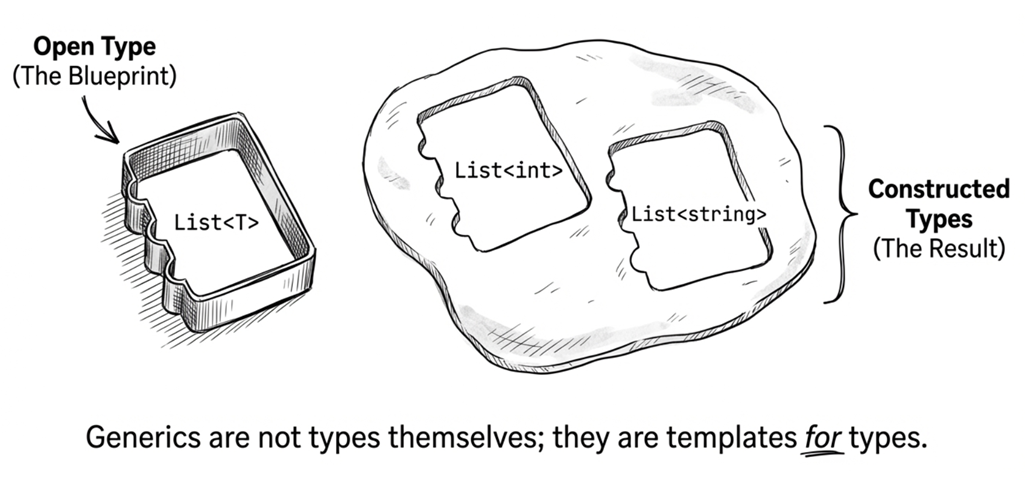
Or more directly: generics are templates for types. If List<int> and List<string> are two different cookie cutters, then List<T> is the template used to create them. It has an empty slot (T) that you fill with a concrete type to create a usable blueprint.
Only constructed types can create objects:
// Error: this does not compile here:
// List<T> myList = new List<T>();

List<int> intList = new List<int>();     // OK
List<string> strList = new List<string>(); // OK
If you are inside a generic class or generic method, and T is in scope there, then new List<T>() is perfectly valid. For example:
public class Repository<T>
{
    private List<T> _items = new List<T>();
}
Whether T is available depends on the generic scope you are in. If T is declared on the current class or method, you can use it in that scope to construct other generic types.
Custom generic classes
Suppose you want your own generic list named MyGenericList.
To keep the focus on the syntax, the example below deliberately reuses ArrayList from the earlier discussion to show how the element type can be turned into a type parameter. In real code, though, you would typically store the data in T[], List<T>, or another generic collection so you keep type safety while also avoiding unnecessary boxing and unboxing. Here is a basic implementation:
public class MyGenericList<T>
{
    private ArrayList _elements = new ArrayList();

    public void Add(T item)
    {
        _elements.Add(item);
    }

    public T this[int index]      // Indexer
    {
        get
        {
            return (T)_elements[index];
        }
        set
        {
            _elements[index] = value;
        }
    }
}
Compare this to the manual IntList and StringList classes. Everywhere the element type used to change is now represented by the single type parameter T.
Creating instances looks like this:
MyGenericList<int> intList = new MyGenericList<int>();
intList.Add(100);
int num = intList[0];

MyGenericList<Employee> empList = new MyGenericList<Employee>();
empList.Add(new Employee("A001", "Michael"));
empList.Add(new Employee("A002", "James"));

Employee anEmp = empList[1];
Here you see two constructed types: MyGenericList<int> and MyGenericList<Employee>. In other words, the same generic definition can accept different type arguments at use time, forming different constructed types that can then create their own object instances.
Constructors and finalizers
Constructors and finalizers for a generic class do not include type parameters in their names:
public class MyGenericList<T>
{
    // Correct: constructor without <T>
    public MyGenericList()
    {
        // ...
    }

    // Correct: finalizer without <T>
    ~MyGenericList()
    {
        // ...
    }

    // Incorrect
    // public MyGenericList<T>() { }
}
Type parameters appear only in class definitions and member signatures, but constructor and finalizer names must omit the type parameter (like MyGenericList, not MyGenericList<T>).
You can still use T inside constructors:
public class MyGenericList<T>
{
    private T[] _elements;

    public MyGenericList(int capacity)
    {
        _elements = new T[capacity];
    }

    public MyGenericList(IEnumerable<T> items)
    {
        _elements = items.ToArray();
    }
}
The key point is not that constructors have special generic syntax. They simply have access to the class-level type parameter T, just like other members do.
Default values
Because T can be any type, you cannot hardcode a default value. Use the default operator:
public class MyGenericList<T>
{
    public T? GetValueOrDefault(int index)
    {
        if (index < 0 || index >= Count)
            return default;  // C# 7.1+ can omit default(T)

        return _elements[index];
    }
}
default returns:
- Value types:
0,false, or a zeroed struct - Reference types:
null
If Nullable Reference Types (NRT) are enabled in the project, a method like this that may return null is often written with a T? return type. That makes the intent clearer and avoids nullable warnings more cleanly.
C# version differences:
// C# 7.0 and earlier: the target type must be stated explicitly
public T GetDefault<T>()
{
    return default(T);
}

// C# 7.1+: you can omit it when the compiler can infer the target type
public T GetDefault<T>()
{
    return default;
}
Practical example: clearing an array
The Zap method below clears any array; the key point is how it handles default values:
public static void Zap<T>(T[] array)
{
    for (int i = 0; i < array.Length; i++)
        array[i] = default!;
}

// Usage
int[] numbers = { 1, 2, 3, 4, 5 };
Zap(numbers);  // All become 0

string[] names = { "Alice", "Bob", "Charlie" };
Zap(names);  // All become null
If Nullable Reference Types are enabled, code like this sometimes uses default! to say, explicitly, “Yes, this may become null here, and that is intentional.” The ! here only suppresses nullable warnings at compile time; it does not change the actual value or prevent null from appearing in the array.
Source code: DemoGenericClass
In the sample project,
MyGenericList<T>has already been rewritten to store data in aT[], which is closer to a practical implementation. The earlierArrayListversion in this section is intentionally simplified to highlight the generic syntax.
Generic attributes (C# 11)
Before C# 11, if you wanted to declare an attribute with a Type parameter, you had to write:
public class TypeAttribute : Attribute
{
    public TypeAttribute(Type t) => ParamType = t;
    public Type ParamType { get; }
}

[Type(typeof(string))]
public void Method() { }
This is verbose and forces you to use the typeof operator. Starting in C# 11, you can declare a generic attribute:
// C# 11: Declare a generic class inheriting from Attribute
public class GenericAttribute<T> : Attribute { }
Usage can directly specify the type argument:
[GenericAttribute<string>()]
public void Method() { }
The restriction is not just that the type argument must be fully constructed (for example, string rather than an open T). It must also satisfy the same limitations that apply to typeof(...) in attribute metadata. In other words, types such as dynamic and List<string?> still cannot be used as type arguments for generic attributes, because they cannot be represented there in a stable way.
More precisely, dynamic is treated as object at the CLR level, and the nullable annotation in string? is not part of the CLR type system, so neither can appear in attribute metadata in the way you might expect. This restriction ensures that the type arguments of a generic attribute can be represented in CLR metadata in a stable, well-defined way.
Source code: DemoGenericAttribute
7.3 Type parameter constraints
So far, we’ve used generics primarily to store values of different types.
However, generic code becomes much more useful when you need to interact with T—such as by calling its methods or accessing its properties. To do that safely, the compiler needs to know more about what T can do.
For example, suppose you want a generic list that can compare its items. You expect the items to have a CompareTo method, but without further information, the compiler cannot guarantee it:
public class MyList<T>
{
    public int Compare(T obj1, T obj2)
    {
        // Compile error: T has no CompareTo
        return obj1.CompareTo(obj2);
    }
}
The error is:
Tdoes not contain a definition forCompareToand no extension methodCompareToaccepting a first argument of typeTcould be found (are you missing a using directive or an assembly reference?)
Even if the type you eventually pass really has CompareTo, the compiler still cannot allow this code based on that hope alone.
Without any constraints, the compiler cannot assume that T has a specific member such as CompareTo. It can use only basic capabilities available to every type, such as Equals(), GetType(), and ToString().
This does not mean that T is “the same as object.” When the generic type is used, T may still be a value type such as int, or a reference type such as string or Employee. The important point is simply that without additional constraints, the compiler can safely assume very little about what T can do.
But that still does not solve the real need: sometimes you really do need to access specific members of the type argument inside generic code. At that point, do not try to solve the problem with an as cast like this:
public class MyList<T>
{
    public int Compare(T obj1, T obj2)
    {
        return (obj1 as IComparable<T>).CompareTo(obj2);
    }
}
This bypasses compile-time checks but risks runtime failure. Note that this uses the as operator, not an explicit cast. If obj1 doesn’t implement IComparable<T>, the as expression evaluates to null, and the subsequent .CompareTo(obj2) call can throw a NullReferenceException. The correct solution is the where clause.
The where clause
You can constrain a type parameter like this:
public class MyList<T> where T : IComparable<T>
{
    public int Compare(T obj1, T obj2)
    {
        return obj1.CompareTo(obj2);
    }
}
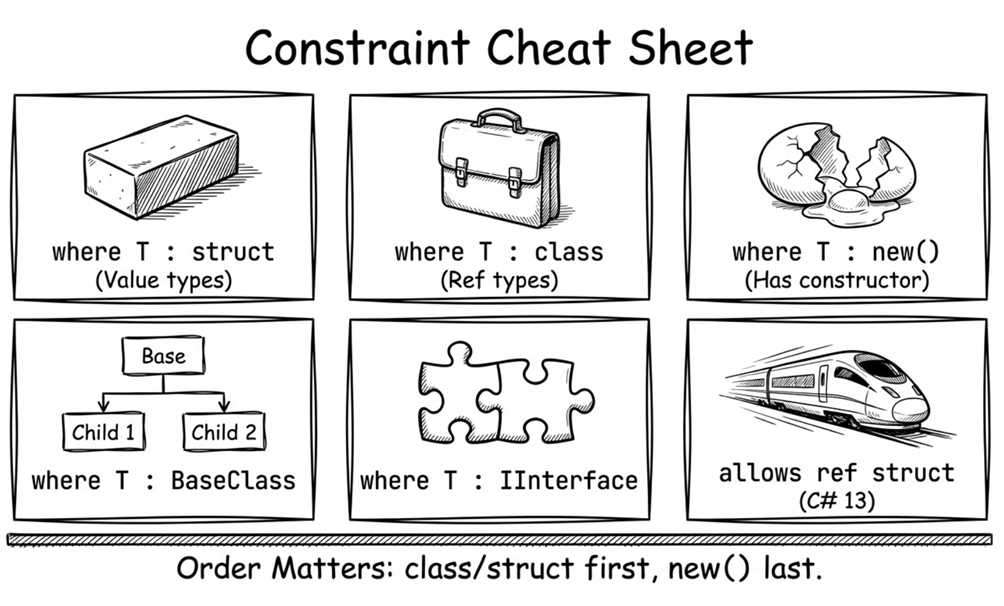
The where clause tells the compiler: any type argument for T must implement IComparable<T>. If not, compilation fails.
This is called a generic constraint. In practice, a constraint tells the compiler what capabilities a type parameter must provide.
Multiple constraints
You can require multiple interfaces and, optionally, a base class (only one base class is allowed because C# does not support multiple inheritance):
public class MyKey { }

public class MyPair<TKey, TValue>
    where TKey : MyKey, IComparable<TKey>, IEquatable<TKey>
    where TValue : IComparable<TValue>
{
    // ...
}
Rules:
- Only one base-class constraint.
- Multiple interface constraints are allowed.
- If you have a base class, it must come first.
class and struct constraints
class or struct can constrain reference types or value types:
public class RefContainer<T> where T : class
{
    // T must be a reference type (class, interface, delegate, record class, etc.)
}

public class ValContainer<T> where T : struct
{
    // T must be a value type
}
These must come first in the constraint list:
public class MyPair<TKey, TValue>
  where TKey : class, IComparable<TKey>, IEquatable<TKey> // class comes first
  where TValue : struct, IEquatable<TValue>  // struct comes first
{
    // ...
}
new() constraint
If you need to create instances of T, you must add the new() constraint:
public class Factory<T> where T : new()
{
    public T CreateInstance()
    {
        return new T();
    }
}
The new() constraint tells the compiler that T must have an accessible parameterless constructor, so new T() is legal inside the generic type or method.
Two rules:
Rule 1: new() usually comes last
public class MyClass<T>
    where T : IComparable<T>, new()
{
    // ...
}
If you use the C# 13 allows ref struct anti-constraint, that anti-constraint must appear after new().
Rule 2: new() cannot be combined with struct
// where T : struct, new() // Compile errorstruct already guarantees that new T() is valid, so new() would be redundant. Starting with C# 10, a struct can also declare its own parameterless constructor, but whether it uses the implicit one or a custom one, the struct constraint already guarantees that new T() can be used.
Common constraint combinations
// Nullable reference type
public class NullableContainer<T> where T : class?
{
    private T? _value;
}

// Non-nullable reference type (with NRT enabled)
public class NonNullContainer<T> where T : class
{
    private T _value = default!;
}

// Interface + parameterless constructor
public class Repository<T>
    where T : IEntity, new()
{
    public T Create() => new T();
}

// Base class constraint
public class DomainService<TEntity, TRepository>
    where TEntity : Entity
    where TRepository : IRepository<TEntity>
{
    // ...
}

// C# 13: allows ref struct (e.g., Span<T>)
public class SpanWrapper<T> where T : allows ref struct
{
    // T can be Span<int>, but must follow ref safety rules
    public void Process(T data) { }
}
allows ref struct constraint (C# 13)
Before C# 13, a generic type parameter T did not allow ref struct types (such as Span<T> or ReadOnlySpan<T>) by default. This was a vital safety measure to ensure that stack-only structures never “escaped” to the heap—something that could happen through boxing or by being stored in a class field.
However, this also limited the use of generic algorithms in high-performance scenarios. To address this, C# 13 introduced the allows ref struct anti-constraint:
public void ProcessData<T>(T data) where T : allows ref struct
{
    // ...
}
With this constraint, the compiler allows you to pass Span<int> and other ref struct types, while also strictly checking that operations inside the method do not violate ref safety rules (for example, you cannot store a variable of type T as a field in a class). This is very helpful for writing high-performance general-purpose libraries.
Generic Math and operator constraints (.NET 7+)
Historically, one of the most common pain points in C# generics was the inability to apply operators like + or - to type parameters: even when constrained with where T : struct, the compiler could not guarantee that T supported addition.
Starting with .NET 7 / C# 11, C# supports static abstract interface members, and the BCL introduced Generic Math. Through the System.Numerics.INumber<T> constraint, generic algorithms can directly invoke arithmetic operators:
using System.Numerics;

// Constrained by INumber<T>, T can be int, double, decimal, or any numeric type
public T Add<T>(T left, T right) where T : INumber<T>
{
    return left + right; // ✔ Compiles! INumber<T> guarantees the existence of operator +
}

Console.WriteLine(Add(10, 20));       // 30
Console.WriteLine(Add(3.14, 2.71));   // 5.85
This capability eliminates the long-standing limitation on generic arithmetic and serves as an essential building block for modern high-performance numerical and geometry libraries.
These constraint rules can look scattered, but in practice you usually add them step by step: add an interface constraint when you need to call an interface member, add new() when you need to create an instance, use INumber<T> when you need arithmetic operations, and consider allows ref struct only when you need to support types such as Span<T>.
Source code: DemoConstraints
7.4 Generic interfaces and structs
Generics also apply to interfaces and structs. Let’s start with interfaces, because they are often used to describe the contract that a family of generic types must follow.
Generic interface
For example, you can extract the list operations from MyGenericList<T> into a generic interface:
public interface IMyList<T>
{
    int Count { get; }
    T this[int index] { get; set; }
    void Add(T item);
    void Clear();
}
Then implement it:
public class MyGenericList<T> : IMyList<T>
{
    private T[] _elements;
    private int _count;

    public int Count => _count;

    public T this[int index]
    {
        get => _elements[index];
        set => _elements[index] = value;
    }

    public void Add(T item) { /* ... */ }
    public void Clear() { /* ... */ }
}
The rule is the same as normal interfaces: implement all required members.
Source code: DemoGenericInterfaces
Implementing generic interfaces
There are two approaches:
Option 1: keep the type parameter open
interface ISayHello<T>
{
    string GetWords(T obj);
}

class Hello1<T> : ISayHello<T>
{
    public string GetWords(T obj)
    {
        return $"Hello, {obj}!";
    }
}

// Usage
var hello = new Hello1<string>();
hello.GetWords("World");
Option 2: close the type parameter
class Hello2 : ISayHello<int>
{
    public string GetWords(int i)
    {
        return $"Hello, {i}!";
    }
}

// Usage
var hello = new Hello2();
hello.GetWords(42);
Both compile. Option 2 is useful when you want a fixed type.
This does not compile:
// Error: cannot implement both ISayHello<int> and ISayHello<T>
class Foo<T> : ISayHello<int>, ISayHello<T>
{
}
If T is substituted with int, then ISayHello<T> becomes ISayHello<int>, which would make the same class implement the same interface twice. To prevent that potential conflict, the compiler rejects this declaration.
Generic structs
Generic structs use the same syntax as generic classes. A classic example is KeyValuePair<TKey, TValue>:
public struct KeyValuePair<TKey, TValue>
{
    public TKey Key { get; }
    public TValue Value { get; }

    public KeyValuePair(TKey key, TValue value)
    {
        Key = key;
        Value = value;
    }
}
Usage:
var pair = new KeyValuePair<string, int>("Age", 30);
Console.WriteLine($"{pair.Key}: {pair.Value}");
The key point here is that generics are not limited to classes and interfaces; structs can also use type parameters to express “the types of this pair of values vary by use case.” KeyValuePair<TKey, TValue>, commonly used when iterating dictionaries, is a representative example of this design.
Source code: DemoGenericStructs
typeof and unbound generic types
Open generic types (like List<T>) and unbound generic types (like List<>) can both be represented at runtime as Type objects. What you cannot do is instantiate a generic type that has not yet been closed with actual type arguments. To create an object, you must first turn it into a constructed type such as List<int>.
That is because List<> is still missing its element type, so at runtime it cannot know whether you want to create List<int>, List<string>, or some other concrete version. In C#, the most common way to refer to an unbound generic type is typeof:
class A<T> { }
class A<T1, T2> { }

Type a1 = typeof(A<>);     // One type parameter
Type a2 = typeof(A<,>);    // Two type parameters

Console.WriteLine(a1.Name);  // A`1
Console.WriteLine(a2.Name);  // A`2
You can also specify closed types:
Type a3 = typeof(A<int, string>);Or, inside a generic class, you can retrieve the Type represented by the type parameter itself:
class B<T>
{
    void X()
    {
        Type t = typeof(T);
    }
}
Practical use: reflection and generics
Once you know how to obtain an unbound generic type with typeof, you can fill in the actual type at runtime. The following example shows a pattern common in frameworks and containers: get Repository<>, then use MakeGenericType to create a closed type such as Repository<Customer>.
public class RepositoryFactory
{
    public static object CreateRepository(Type entityType)
    {
        Type openType = typeof(Repository<>);

        Type closedType = openType.MakeGenericType(entityType);

        return Activator.CreateInstance(closedType);
    }
}

// Usage:
var customerRepo = RepositoryFactory.CreateRepository(typeof(Customer));
// Equivalent to new Repository<Customer>()
This pattern is common in framework design and dependency injection containers.
Source code: DemoUnboundGenericTypes
7.5 Generic methods
A generic method is a method with type parameters. It can live inside any class, struct, or interface, generic or not.
Basic syntax
ReturnType MethodName<T1, ..., Tn>(parameters) [where clause]
{
    // Method body
}
Notes:
<T1, ..., Tn>are type parameters.(parameters)are formal parameters.- The
whereclause is optional.
Example:
class Utility
{
    public void Print<T>(T obj)
    {
        Console.WriteLine($"Type: {typeof(T).Name}, Value: {obj}");
    }

    public TResult Create<T, TResult>(T obj) where TResult : new()
    {
        Console.WriteLine($"Creating from {obj}");
        return new TResult();
    }
}
Usage:
var util = new Utility();
util.Print<int>(100);
util.Print<string>("Hello");

var result = util.Create<string, DateTime>("now");
Type inference
If the compiler can infer type arguments from parameters, you can omit them:
var util = new Utility();
util.Print(100);
util.Print("Hello");

// This fails because TResult cannot be inferred
// var result = util.Create("now");

var result = util.Create<string, DateTime>("now");
The last call still needs explicit type arguments because C# generic method inference works primarily from the method arguments, not from the type of the variable receiving the return value. In other words, even if you assign the result to a DateTime variable, the compiler still cannot infer TResult from that alone.
Method-level vs class-level type parameters
If multiple methods share the same type parameter, you can move it to the class level:
class Demo<T>
{
    public void Method1(T obj)
    {
        Console.WriteLine(obj);
    }

    public void Method2<U>(U obj)
    {
        Console.WriteLine(obj);
    }

    public void Method3<T>(T obj)  // This shadows the class-level T
    {
        Console.WriteLine(obj);
    }
}
Avoid shadowing like Method3<T> because it can be confusing. Here, the T in Method3<T> is a new method-level type parameter, not the same type parameter as the T in Demo<T>; the method can therefore use a different type from the class.
Generic extension methods
Extension methods can be generic too:
public static class ListExtensions
{
    public static void PrintAll<T>(this List<T> list)
    {
        Console.WriteLine($"[{string.Join(", ", list)}]");
    }

    public static List<TResult> MapAll<T, TResult>(
        this List<T> source,
        Func<T, TResult> converter)
    {
        var result = new List<TResult>();
        foreach (var item in source)
        {
            result.Add(converter(item));
        }
        return result;
    }
}
Usage:
var numbers = new List<int> { 1, 2, 3 };
numbers.PrintAll();

var strings = numbers.MapAll(n => $"Item {n}");
strings.PrintAll();  // [Item 1, Item 2, Item 3]
Source code: DemoGenericMethods
After seeing how generics work on classes, interfaces, structs, and methods, let’s move on to type compatibility between generic types: when does an assignment that looks reasonable still get rejected by the compiler?
7.6 Covariance and contravariance
Bruce: “Tell me, is a string an object?”
Robin: “Of course.” (Too easy.)
“Then is a list of strings a list of objects?”
Robin hesitates, but says yes.
“Good,” Bruce says. “What if I assign a
List<String>to aList<Object>? Does it compile? Or does it compile but fail at runtime?”Robin: “Uh…”
To answer that question, we need to explore how generic types are compatible with one another. The key concepts are covariance and contravariance, introduced for generics in C# 4. They can feel abstract at first, so we will work through them with examples.
Type compatibility basics
All variance concepts are about type safety, especially compile-time checks. They describe when one type can be treated as another compatible type.
These ideas existed before .NET 4: C# arrays are covariant.
In C#, a derived type can be assigned to a base type:
string s = "Hello";
object obj = s;  // OK
Here is the same rule shown with arrays:
string[] strings = new string[3];
object[] objects = strings;  // Covariant array assignment
But this is unsafe. The problem is that the compiler lets you put a DateTime into an object[], even though that array is really still a string[]. You can see the issue more clearly here:
string[] strings = new string[3];
object[] objects = strings;

objects[0] = DateTime.Now;  // Compiles, but fails at runtime
The last line throws an ArrayTypeMismatchException at runtime.
In other words, array covariance lets some type mismatches slip past compile time and fail only at runtime. Generic collections use stricter rules by default so errors like this are caught earlier. That is one important value of generic collections.
Invariance of generics
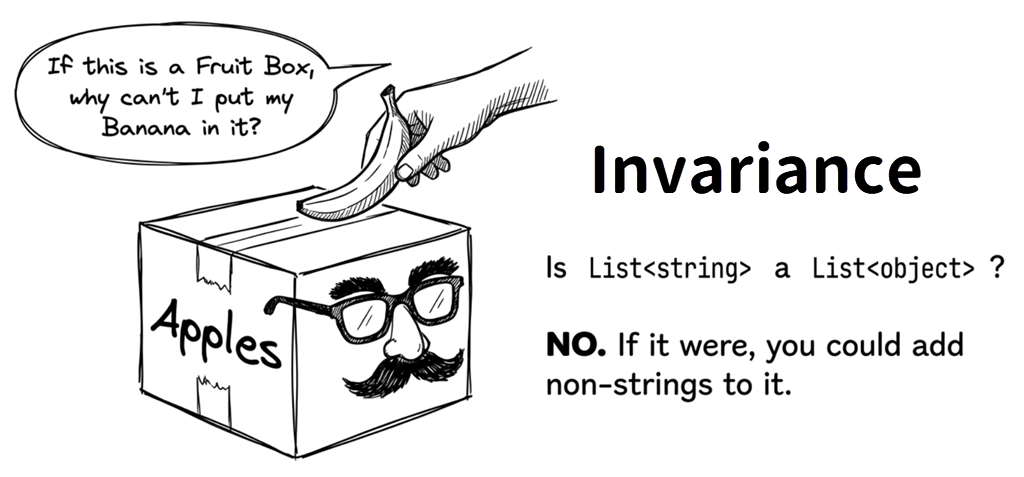
Many readers first see this and instinctively think, “If string is an object, shouldn’t List<string> also count as a List<object>?” But this is still not allowed:
List<string> stringList = new List<string>();
List<object> objectList = stringList;  // Not allowed
You get:
Cannot implicitly convert type System.Collections.Generic.List<string>
 to System.Collections.Generic.List<object>
Why is this forbidden? Because by default, generic types are invariant. A simple analogy helps explain why:
List<string>is a box that can specifically hold only apples.List<object>is a box that can hold any kind of fruit.
If you treat the apple box as a general fruit box, someone might try to put a banana in it. But an apple box can’t handle bananas! That mismatch would break type safety, which is why the compiler forbids the conversion.
Covariance
Although List<string> cannot be treated directly as List<object>, that restriction can feel inconvenient in scenarios where you only need to read the elements. Covariance helps in those read-only-style scenarios. Starting with C# 4, you can do:
List<string> stringList = new List<string>();
IEnumerable<object> objects = stringList;  // OK
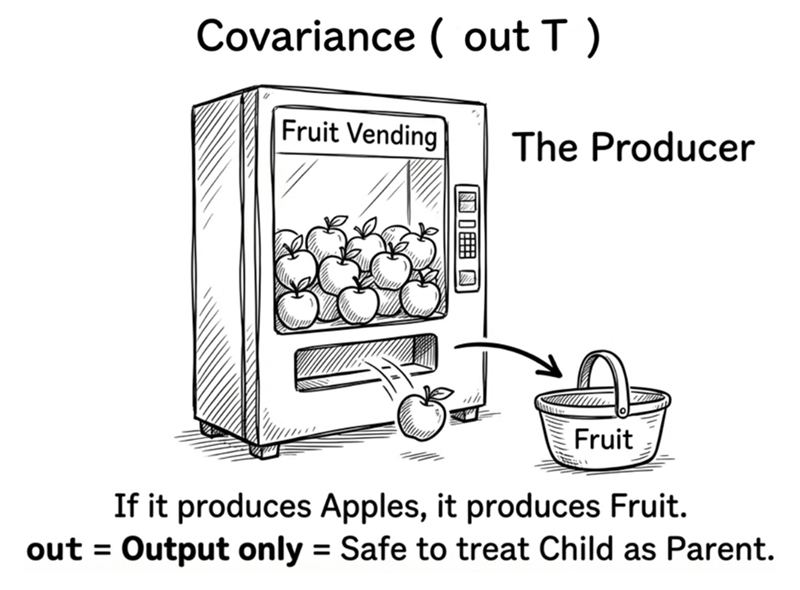
IEnumerable<T> is covariant because its definition uses out:
public interface IEnumerable<out T> : IEnumerable
{
    IEnumerator<T> GetEnumerator();
}
out T means T only appears in output positions, which preserves type safety:
public interface IProducer<out T>
{
    T GetValue();
    // void SetValue(T value); // Not allowed
}
Because T is output-only, using IProducer<string> as IProducer<object> is safe.
Contravariance
Contravariance uses in and restricts T to input positions:
public interface IConsumer<in T>
{
    void Process(T value);
    // T GetValue(); // Not allowed
}
This allows:
IConsumer<object> objectConsumer = new ObjectProcessor();
IConsumer<string> stringConsumer = objectConsumer;  // OK
If something can consume any object, it can consume a string.
Example: comparers
IComparer<T> is contravariant:
public interface IComparer<in T>
{
    int Compare(T x, T y);
}
class ObjectComparer : IComparer<object>
{
public int Compare(object? x, object? y)
{
if (x == null && y == null) return 0;
if (x == null) return -1;
if (y == null) return 1;
return string.Compare(x.ToString(), y.ToString());
}
}Because IComparer<in T> is contravariant:
IComparer<object> objectComparer = new ObjectComparer();
IComparer<string> stringComparer = objectComparer;  // OK

var list = new List<string> { "C", "A", "B" };
list.Sort(stringComparer);
Variance in delegates
Func<T> and Action<T> are variant:
// Func<out TResult> is covariant
Func<string> stringFactory = () => "Hello";
Func<object> objectFactory = stringFactory;

// Action<in T> is contravariant
Action<object> objectAction = obj => Console.WriteLine(obj);
Action<string> stringAction = objectAction;
General rule:
public delegate TResult Func<in T, out TResult>(T arg);
//                            ^^       ^^^
//                         input: in  output: out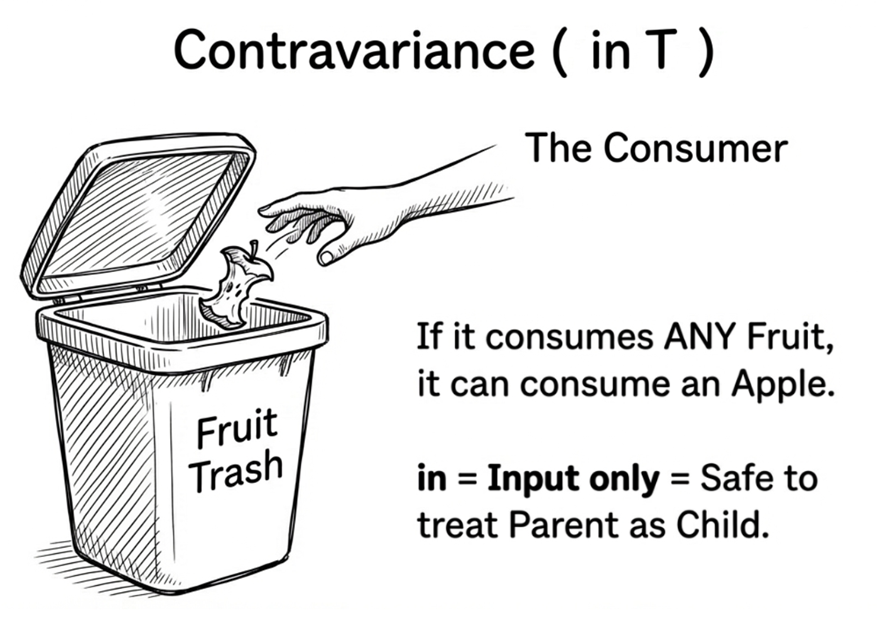
A simple memory aid
These two terms are easy to mix up. A useful approach is to remember the direction first, then come back to where out and in appear:
- out = output = covariance: producer. If you can produce a more specific type, you can be used where a more general type is expected.
- Direction: Child → parent
- in = input = contravariance: consumer/tool. If you can consume a general type, you can also consume a more specific type.
- Direction: Parent → child
// Covariance: producer
IEnumerable<Apple> apples = ...;
IEnumerable<Fruit> fruits = apples;  // OK

// Contravariance: consumer
//      If it can handle Fruit, it can also be used to handle Apple.
IComparer<Fruit> fruitComparer = ...;
IComparer<Apple> appleComparer = fruitComparer;  // OK
Limitations
Variance applies only to:
- Generic interfaces
- Generic delegates
It does not apply to:
- Generic classes (
List<T>is invariant) - Generic structs
- Generic method type parameters
Also note that declaring out / in does not require a class constraint:
public interface IProducer<out T>
{
    T GetValue();
}
However, variance conversions only happen when the generic type is constructed with a reference type. If the type argument is a value type, that conversion does not apply. That is because variance relies on type-compatible reference conversions; converting int to object requires boxing, which is not the same kind of direct reference conversion, so you must handle it explicitly:
IEnumerable<int> ints = new List<int>();
// IEnumerable<object> objects = ints;  // Error: int is a value type
IEnumerable<object> objects = ints.Cast<object>();
Source code: DemoCovariance
Remember the key point: if a generic type both accepts T and returns T, you usually cannot freely make it covariant or contravariant. Only interfaces and delegates with a clear direction are good candidates for out or in.
7.7 Performance characteristics of generics
Next, let’s look at a few runtime characteristics of generics. They are helpful when evaluating collections, performance, or static field behavior.
Generic vs non-generic collections
Generic collections avoid boxing/unboxing overhead. Boxing wraps a value type as an object, which usually involves allocation and copying; unboxing then unwraps the object back into the original value type:
// Non-generic: boxing occurs
ArrayList arrayList = new ArrayList();
arrayList.Add(42);              // boxing: int -> object
int value1 = (int)arrayList[0]; // unboxing: object -> int

// Generic: no boxing
List<int> genericList = new List<int>();
genericList.Add(42);
int value2 = genericList[0];
This extends a key benefit introduced earlier in the chapter: when the collection itself knows the element type, both the compiler and the runtime can avoid some unnecessary work.
Generics and memory
Each constructed type gets its own static fields. For example:
public class Singleton<T> where T : new()
{
    private static T _instance = new T();

    public static T Instance => _instance;
}

// These two reads access separate static instances for different constructed types
var intSingleton = Singleton<int>.Instance;
var listSingleton = Singleton<List<string>>.Instance;
In other words, static fields belong to concrete types such as Singleton<int> and Singleton<string>, not to the generic definition Singleton<T> before T has been specified.
Therefore, whenever the type argument differs, you should treat the result as a different constructed type. This is especially important when designing caches, singletons, or static state.
Type specialization and code sharing in JIT mode
When you see constructed types such as List<int>, List<string>, and List<Employee>, you may wonder whether the runtime generates separate machine code for every type. This affects code size and some performance characteristics, and .NET’s answer is not simply “all shared” or “all separate.”
In the usual JIT execution model, .NET retains generic type information until runtime. The JIT compiler then decides how to generate machine code for each constructed type. The typical cases are:
- Reference types: Constructed types whose type argument is a reference type can usually share most of their machine code. For example,
List<string>andList<Employee>can share most of the generic implementation. - Value types: The runtime usually generates specialized versions for different value types, so
List<int>andList<double>can have their own machine code.
Different reference types have the same machine-level representation as object references, while value types can differ in size, layout, and available operations. This gives the JIT opportunities to produce more specific code for value types.
Note
This describes typical behavior in the usual JIT execution model, not a fixed process shared by every .NET deployment model. With Native AOT, the application is compiled into native code during publishing, so there is no runtime step in which the JIT “expands” its generic types.
This also explains why “a template for a type” is only a useful metaphor. .NET preserves generic type arguments in its metadata and type system, while the deployment model and runtime determine the actual machine code. In everyday API design, avoid relying on one fixed code-sharing strategy. If code size or execution performance matters, measure it using the deployment model you actually plan to use.
7.8 Practical guidelines
This section focuses on when to use generics and what to watch for when designing generic APIs.
When to use generics
Good fits:
- Collection classes (List, Dictionary, Queue, etc.)
- Data-structure algorithms (sorting, searching)
- Factory pattern
- Repository pattern
- Result/Option types
Situations requiring careful evaluation or poor fits:
- Too many type parameters with tangled responsibilities: When a class or method requires more than three type parameters, it is often a code smell indicating that the API takes on too many responsibilities. Examine whether each type parameter truly represents an independent data contract. If parameters represent configuration, logging, or helper services, prefer constructor injection, interfaces, or composition over crowding angle brackets (see Principle 1 below).
- Logic tightly coupled to concrete implementations: If method logic relies heavily on specific properties or private details of concrete types, using generics forces you to rely on
is,as, or casting to inspect types—undermining the core value of compile-time type safety. In such cases, prefer ordinary concrete methods, interface contracts, composition/strategy patterns, or inheritance when an “is-a” relationship genuinely applies. - Heavy reliance on dynamic reflection or Native AOT constraints: If an algorithm depends heavily on runtime type inspection and dynamically creating open generic types (e.g., via
MakeGenericType), generics add code complexity, incur performance overhead, and can introduce trimming and code-generation compatibility risks under Native AOT. Simpler non-generic interfaces or polymorphic abstractions are often much more practical.
Designing generic APIs
Good generic API design keeps caller code clear. Poor design makes type parameters and angle brackets harder to read than the actual logic. Here are some principles:
Principle 1: minimize type parameters
// Bad: too many parameters
public class Processor<TInput, TOutput, TConfig, TLogger, TValidator>
{
    // ...
}

// Better: split responsibilities
public class Processor<TInput, TOutput>
{
    private readonly IConfig _config;
    private readonly ILogger _logger;
    // ...
}
The more type parameters you add, the harder it is for callers to see what role each one plays. If some of those dependencies are not really part of the data type itself, constructor injection, interfaces, or configuration objects often express the design more clearly.
Principle 2: use meaningful names
// Bad
public class Map<T, U> { }

// Better
public class Map<TKey, TValue> { }
A single type parameter named T is common, but when a type parameter has a clear role, names like TKey and TValue make the API’s intent visible right in the signature.
Principle 3: use constraints appropriately
// Too loose: allows any type
public class Repository<T>
{
    public void Save(T entity)
    {
        // How do we access entity.Id?
    }
}

// Better: constrain T
public class Repository<T> where T : IEntity
{
    public void Save(T entity)
    {
        // Safe to access entity.Id
    }
}
Constraints are not about making a type look stricter; they are about telling the compiler what capabilities the method actually needs. That moves mistakes to the call site instead of letting them surface later at runtime.
Principle 4: prefer generic interfaces
// Good: depend on interfaces
public void Process<T>(IEnumerable<T> items)
{
    // Accepts any IEnumerable<T>
}

// Less flexible
public void Process<T>(List<T> items)
{
    // Only List<T>
}
If a method only needs to enumerate elements, keep the parameter at a smaller contract such as IEnumerable<T>. That preserves caller flexibility and makes the method easier to reuse.
Generics and AI collaboration
When using AI to draft generic code, watch for common pitfalls.
Pitfall 1: missing constraints
// AI might produce this
public class Comparer<T>
{
    public int Compare(T x, T y)
    {
        return x.CompareTo(y);  // Compile error
    }
}

// Prompt should require:
// "Implement a generic comparer where T implements IComparable<T>"
Note: syntax shorthand and style preferences
AI-generated code sometimes defaults to earlier syntax styles. For example, returning a default value:
// Earlier syntax (C# 2.0+, completely valid but more verbose)
public T GetDefault<T>()
{
    return default(T);
}

// Modern shorthand (C# 7.1+, type can be omitted)
public T GetDefault<T>()
{
    return default;
}
Both produce identical runtime behavior. default(T) is not an error; modern C# simply allows a more concise form. When reviewing AI-generated generic code, your primary focus should be on whether type constraints are sufficient and satisfy business contracts (as in pitfall 1), rather than merely swapping syntax preferences.
Sample prompt:
Use C# 12+ syntax to implement a generic Repository<T>.
T must be a reference type that implements IEntity.
Provide Add, Update, Delete, and GetById methods.
Use async/await for asynchronous operations.
Summary
This chapter covered the core concepts and practical use of generics:
- Value of generics: Type safety, performance, and reuse
- Type parameters: Open types vs constructed types
- Composite types:
class/struct/new() - Generic interfaces and methods: Flexible abstraction
- Covariance and contravariance: Using
outandin - Practical guidance: When to use generics and how to design APIs
Next chapter: delegates and events, where we learn how to pass methods as parameters and implement event-driven programming.
Exercises
Exercise 1: Implement a generic stack
Implement a generic stack MyStack<T> that supports:
Push(T item)Pop()(returns the top item)Peek()(returns the top item without removing it)Countproperty
Requirements:
- Use an array internally
- Auto-grow when capacity is insufficient
PopandPeekshould throwInvalidOperationExceptionwhen empty
Exercise 2: Implement a generic pair
Implement a Pair<T1, T2> class that stores two values and implements IEquatable<Pair<T1, T2>> for equality comparison.
Exercise 3: Generic arithmetic in practice (Generic Math Challenge)
Using Generic Math introduced in Section 7.3, implement a generic method that calculates the average of any numeric collection:
public T Average<T>(IEnumerable<T> numbers) where T : INumber<T>Questions to consider:
- How can you use
T.Zeroas the initial sum value? When dividing by the element count, what is the semantic difference between integer types and floating-point types? - (Alternative approach) In older .NET environments that lack Generic Math, how could you achieve a similar generic algorithm by injecting operation delegates (such as
Func<T, T, T>) or strategy objects via constructors?
Exercise 4: Covariance in practice
Assume this class hierarchy:
class Animal { }
class Dog : Animal { }
class Cat : Animal { }
Design an IAnimalShelter<T> interface so that IAnimalShelter<Dog> can be assigned to IAnimalShelter<Animal>.
Glossary
| Term | Description |
|---|---|
| Boxing | Converting a value type into a reference type (object) |
| Closed type | Same as constructed type |
| Constructed type | A generic type with type arguments, such as List<int> |
| Contravariance | in allows a wider type such as IComparer<object> to be used safely as IComparer<string> |
| Covariance | out allows a narrower type such as IEnumerable<string> to be used safely as IEnumerable<object> |
| Generic constraint | Same as type constraints |
| Generic method | A method that has type parameters |
| Generic type | A parameterized type definition |
| Invariance | The default behavior for generics, no type conversion |
| Open type | A generic type definition without type arguments, like List<T> |
| Reflection | Inspect and manipulate type info at runtime |
| Type constraint | Use where to restrict type parameters |
| Type inference | Compiler infers type arguments from parameters |
| Type parameter | The <T> in generics, such as <TKey, TValue> |
| Unbound generic type | Type object from typeof(List<>) |
| Unboxing | Converting a reference type back into a value type |