Chapter 11: Extension methods
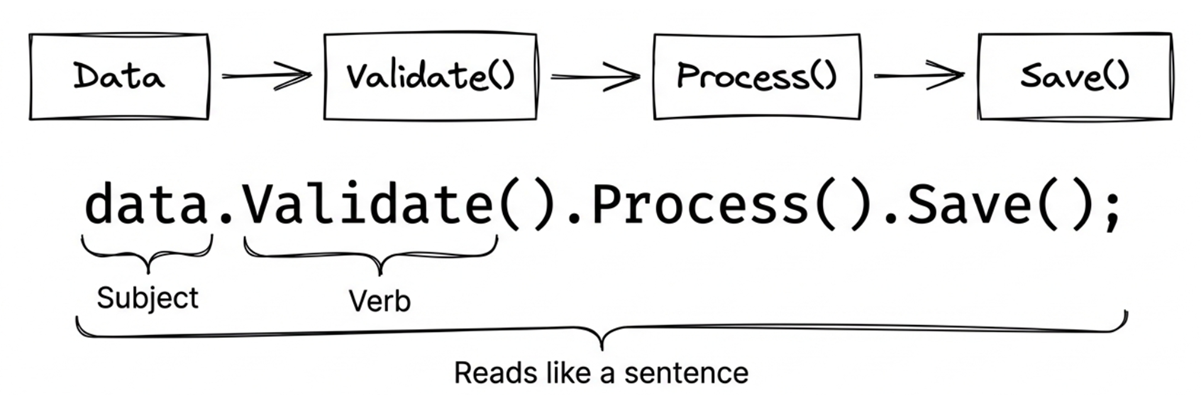
In software development, we often want to extend existing classes with practical functionality. Traditional approaches typically involve either inheritance or writing a static helper class. Each approach has its own drawbacks: inheritance often complicates the class hierarchy, and static helper classes aren’t very intuitive. Writing Helper.Do(obj) feels much less natural than calling obj.Do() directly.
C# 3.0 introduced extension methods to solve this problem. They allow you to add new methods to a class without modifying the original code (even for classes where you don’t have the source), and calling them feels exactly like using native instance methods. By C# 14, the syntax goes further with extension members, allowing you to extend not only methods but also properties and operators.
This chapter starts with the practical problem extension methods are meant to solve, then moves through their syntax, operating principles, best practices, the new C# 14 syntax, and ways to resolve method conflicts. Finally, we will look at several practical examples of extension methods in real projects.
11.1 Why extension methods?
Before getting into the syntax, let’s return to the problem extension methods are meant to solve: without extension methods, how would we usually handle this kind of requirement, and where does the traditional approach get awkward?
Pain points of traditional static helper classes
If you write .NET applications often, you probably create utility classes for common tasks. For string processing, for example, we might write a StringHelper class for reversing strings or capitalizing them. Typically, these are static classes, meaning they can’t be instantiated:
public static class StringHelper
{
    public static string Reverse(string s)
    {
        if (string.IsNullOrEmpty(s)) return s;

        char[] charArray = s.ToCharArray();
        Array.Reverse(charArray);
        return new string(charArray);
    }

    public static string Capitalize(string s)
    {
        if (string.IsNullOrEmpty(s))
            return s;
        return char.ToUpper(s[0]) + s[1..];
    }
}
If we want to combine these two operations—reversing a string and then capitalizing its first letter—the code might look like this:
string s1 = "abcdefg";
string s2 = StringHelper.Capitalize(StringHelper.Reverse(s1));
Drawbacks of this approach:
- Poor Readability: Nested calls make the execution order the reverse of the reading order.
- Not Intuitive: It does not look like an operation on the string itself.
- Hard to Chain: It is difficult to fluently chain multiple operations.
Advantages of extension methods
If we change these two methods into extension methods, the earlier code can be rewritten like this:
string s1 = "abcdefg";
string s2 = s1.Reverse().Capitalize();
Advantages:
- ✔ Natural Reading Order: From left to right, matching how we naturally read.
- ✔ Object-Oriented Style: Looks as though the
Stringclass originally provided these methods. - ✔ Fluent Interface (Fluent API): Supports method chaining.
Source Code: DemoWhyExtension
11.2 Extension method syntax
The syntax of extension methods is fairly simple. The key lies in the this keyword. Once you understand that core idea, writing your own extension methods becomes straightforward.
Basic syntax: the this keyword
To change a static method to an extension method, simply add the this keyword before the first parameter:
public static class StringHelper
{
    public static string Reverse(this string s)
    {
        if (string.IsNullOrEmpty(s)) return s;

        char[] charArray = s.ToCharArray();
        Array.Reverse(charArray);
        return new string(charArray);
    }

    public static string Capitalize(this string s)
    {
        if (string.IsNullOrEmpty(s)) return s;
        return char.ToUpper(s[0]) + s[1..];
    }
}
Key syntax rules:
- Must be declared in a top-level, nongeneric static class: Extension methods cannot be declared in a nested class.
- Must be a static method: The method itself must also be
static. thismodifier on the first parameter: The compiler treats this type as the type the method intends to extend.- First parameter represents the target object: Automatically passed when called.
In other words, this string s is not an extra argument the caller has to supply. It tells the compiler: “Attach this method to string.”
How to determine the target class for extension?
The compiler treats the type modified by the keyword this as the class the method intends to extend. For example:
public static string ToString(this DateTime aDate, char sep)
{
    return $"{aDate.Year}{sep}{aDate.Month:D2}{sep}{aDate.Day:D2}";
}
This makes ToString an extension method on the DateTime class, and this DateTime aDate in the parameter list represents the current object.
When calling:
DateTime now = DateTime.Now;
string formatted = now.ToString('/');  // for example: "2026/03/28"
Extending interfaces
Extension methods can extend not only concrete classes but also interfaces. The core mechanism of LINQ is implemented by extending the IEnumerable<T> interface:
public static class EnumerableExtensions
{
    public static T First<T>(this IEnumerable<T> sequence)
    {
        foreach (T element in sequence)
            return element;
        throw new InvalidOperationException("Sequence contains no elements!");
    }
}
When used, all types implementing IEnumerable<T> can use this extension method:
char firstChar = "Seattle".First();  // 'S'
int firstNumber = new[] { 1, 2, 3 }.First();  // 1
var firstItem = myList.First(); // List<T> also implements IEnumerable<T>
Note the first line of the example above: "Seattle" is a string, and string implements the IEnumerable<char> interface, so the First() extension method can be called, returning the first character ‘S’. Similarly, int[] and List<T> implement IEnumerable<T>, so they can also use this extension method.
The underlying rule is simple: when resolving an extension method, the compiler checks whether the receiver can be assigned to the type of the this parameter. If the answer is yes, that method becomes a candidate. So when the this parameter is IEnumerable<T>, any type implementing that interface can use the method without needing separate definitions for each concrete type.
This is also the core operating principle of LINQ—by extending the IEnumerable<T> interface, LINQ methods (like Where, Select, OrderBy) can be applied to arrays, collections, strings, and many other types. What makes this work is the compiler’s static method resolution based on the this parameter type, not runtime dynamic binding.
Parameter passing rules
Although declared as static, extension methods are called in the same way as regular instance methods. Since the compiler passes the current object to the first parameter of the extension method (the parameter modified by this), the call site supplies one fewer argument than the method declares.
// Declaration: Two parameters (this DateTime aDate, char separator)
public static string ToString(this DateTime aDate, char separator) { ... }

// Call: Pass only one argument (separator)
DateTime.Now.ToString('/');
Note
thiscan only be used for the first parameter. If you addthisto the second or subsequent parameters, the program will not compile.
11.3 Extension method best practices
Although extension methods are powerful, improper use can cause maintenance headaches and confuse colleagues or your future self. This section summarizes several practical guidelines.
1. Do not pollute core namespaces
✘ Not Recommended:
namespace System  // Polluted the System namespace!
{
    public static class StringExtensions
    {
        public static string Reverse(this string s) { ... }
    }
}
✔ Recommended:
namespace MyCompany.Extensions
{
    public static class StringExtensions
    {
        public static string Reverse(this string s)
        {
            /* ... */
        }
    }
}
Reason:
- Placing extension methods under
Systemor other root namespaces makes them visible to all code using that namespace. - It pollutes IntelliSense and increases cognitive load.
- It also increases the risk of conflicts with extension methods from other libraries.
2. Prioritize extending interfaces over concrete classes
Targeting concrete classes (Not best practice):
public static int Product(this List<int> numbers)
{
    return numbers.Aggregate(1, (acc, n) => acc * n);
}
✔ Prioritize extending interfaces:
public static int Product(this IEnumerable<int> numbers)
{
    return numbers.Aggregate(1, (acc, n) => acc * n);
}
Advantages:
- Broader applicability (
List<int>,int[],HashSet<int>can all use it). - Follows the principle of program to an interface, not an implementation.
3. Use generic extensions to improve reusability
When the extension logic does not depend on a specific element type, generics let the same method apply more broadly. The following example lets any IEnumerable<T> report whether it is null or empty:
public static class EnumerableExtensions
{
    // ✔ Generic version, applicable to all IEnumerable<T>
    public static bool IsNullOrEmpty<T>(this IEnumerable<T>? source)
    {
        return source == null || !source.Any();
    }
}

// Usage
List<string> names = GetNames();
if (names.IsNullOrEmpty())
{
    Console.WriteLine("No data");
}
4. Ensure null safety
Extension methods can be called on null references (because they are actually static methods), so null cases must be handled:
public static class StringExtensions
{
    public static bool IsNullOrWhiteSpace(this string? value)
    {
        return string.IsNullOrWhiteSpace(value);
    }

    public static string Truncate(this string? value, int maxLength)
    {
        if (value == null) return string.Empty;
        return value.Length <= maxLength ? value : value.Substring(0, maxLength);
    }
}

// Can be safely called on null
string? text = null;
bool isEmpty = text.IsNullOrWhiteSpace();  // true
5. Performance considerations
Code that uses extension methods does not add a special runtime dispatch cost, because the compiler rewrites it at compile time. If you inspect the generated IL with a decompiler, you’ll see that an extension method call is fundamentally compiled into a static method call.
The following code snippet simply illustrates the compiler’s transformation rules:
// Source code (extension method syntax)
string result = "hello".Reverse();

// compiled equivalent (static method call)
string result = StringExtensions.Reverse("hello");
More generally, the transformation looks like this:
// Extension method call
arg0.Method(arg1, arg2, ...);

// Compiled to static method call
StaticClass.Method(arg0, arg1, arg2, ...);
Because extension methods are fundamentally compiled into ordinary static method calls, they have the following architectural and performance characteristics:
- No special dispatch mechanism: After compilation, an extension method is still just a normal static method call. The extension syntax itself does not introduce extra runtime lookup work.
- You can reason about performance like any other static method: The JIT compiler evaluates extension methods the same way it evaluates other static methods, but whether a call is inlined still depends on the method body and runtime conditions.
- The real performance bottleneck is still the implementation: Performance is determined mainly by your algorithm, allocations, and whether you enumerate data repeatedly.
Source Code: DemoExtensionSyntax
11.4 Extension members (C# 14)
The this parameter syntax introduced earlier handles most needs, but it has a limitation: it can only define extension methods, not properties or operators. C# 14 introduced the new extension block syntax, expanding what extension methods can express. You can now define not only extension methods but also:
- Extension properties
- Extension indexers (C# 15)
- Extension static methods
- Extension static properties
- Extension operators
extension block
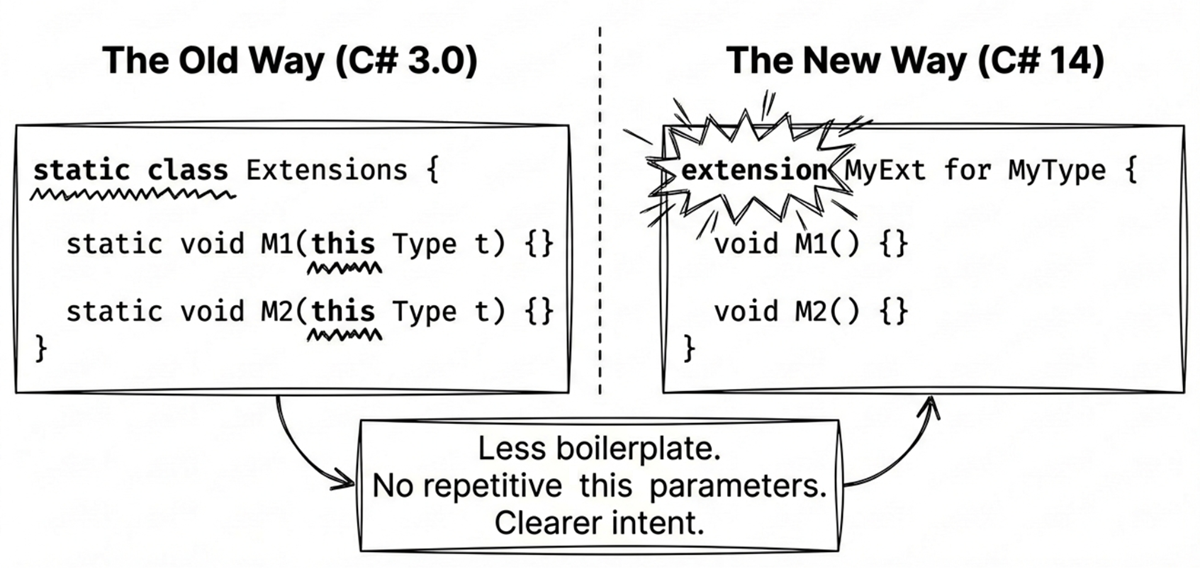
C# 14 uses the extension keyword to define an extension member block. The following example shows how to add extension members to the string type:
public static class StringExtensions
{
    // Extension member block (instance members)
    extension(string s)
    {
        // Extension property (avoid naming conflict with string.IsNullOrEmpty method)
        public bool IsEmpty => string.IsNullOrEmpty(s);

        // Extension method
        public string Reverse()
        {
            if (string.IsNullOrEmpty(s)) return s;
            var chars = s.ToCharArray();
            Array.Reverse(chars);
            return new string(chars);
        }
    }
}
One benefit of this style is that, unlike traditional extension methods, you don’t need to add the this parameter to every extension member. You specify it once when declaring the block: extension(string s).
At the call site, the syntax still looks like a normal member access:
string text = "hello";
bool isEmpty = text.IsEmpty;      // Extension property
string reversed = text.Reverse();   // Extension method
IsEmpty in line 2 is an extension property, so parentheses are not needed when calling it, just as with a normal property. Reverse(), by contrast, is an extension method, so it still requires parentheses. This is one advantage of the new C# 14 syntax: previously, traditional syntax couldn’t define extension properties, so you could only write text.IsEmpty(); now you can use the more natural text.IsEmpty property syntax.
Generic extension members
Generic type parameters can be specified on the extension block itself. For example, here is a generic extension property that checks whether a collection is empty:
public static class CollectionExtensions
{
    // Extension block with generic type parameter
    extension<T>(IEnumerable<T> source)
    {
        public bool IsEmpty => !source.Any();
    }
}
Call it like this:
var list = new List<int>();
bool empty = list.IsEmpty;  // Extension property on generic type
Filtering nulls in collections
You can also use this syntax to write a clean WhereNotNull extension method:
public static class NullableExtensions
{
    extension<TSource>(IEnumerable<TSource?> source)
        where TSource : class
    {
        public IEnumerable<TSource> WhereNotNull()
        {
            foreach (var item in source)
            {
                if (item is not null)
                {
                    yield return item;
                }
            }
        }
    }
}
There are two key points here:
where TSource : classmeansTSourceitself is a non-nullable reference type.- The receiver type is written as
IEnumerable<TSource?>, which means the input sequence is still allowed to contain null elements.
You can call it like this:
var names = new[] { "Alice", null, "Bob", null };
var validNames = names.WhereNotNull();
Here, names is inferred as string?[], while validNames is inferred as IEnumerable<string>. In other words, the method not only filters out null values at runtime, but also narrows the element type of the returned sequence to a non-nullable reference type. If you instead wrote the receiver as IEnumerable<TSource> together with where TSource : class?, you could still filter nulls at runtime, but the element type of the returned sequence would usually remain nullable, leaving callers unable to tell from the type annotations that nulls have already been eliminated.
Extension indexers (C# 15)
While C# 14 introduced extension properties and extension operators, one gap remained: the inability to define indexers for existing types.
For example, when working with custom data streams, sequence wrappers, or third-party collection interfaces (such as IEnumerable<T>), if you wanted bracket subscript syntax like [index], you previously had to write a GetAt(int index) extension method.
In C# 15, the extension block adds this capability, allowing indexers to be declared directly within instance extension blocks:
public static class SequenceExtensions
{
    // Define extension members for a generic sequence
    extension<T>(IEnumerable<T> sequence)
    {
        // C# 15 extension indexer: provides square-bracket subscript access
        public T this[int index] => sequence.ElementAt(index);
    }
}
At call sites, simply importing that namespace enables native bracket indexing:
IEnumerable<int> stream = GetEventStream();
int thirdEvent = stream[2]; // Read the third event directly via indexer
Source code: DemoExtensionIndexer
Pitfall guidance: watch computational complexity
Native arrays and List<T> indexers operate in \(O(1)\) constant time. However, when defining extension indexers for forward-only sequences like IEnumerable<T>, the underlying ElementAt must traverse from the start, costing \(O(n)\) time.
Therefore, when designing extension indexers, clearly document the performance characteristics in XML doc comments or naming to prevent callers from inadvertently creating \(O(n^2)\) bottlenecks by indexing stream[i] inside loops.
Extension static members
The extension blocks introduced earlier all have parameter names (like string s), which means they define instance members. If you specify only the type without a parameter name, you define static extension members. Here is an example using IEnumerable<TSource>:
public static class EnumerableExtensions
{
    // Extension static members (Note: no parameter name)
    extension<TSource>(IEnumerable<TSource>)
    {
        // Static extension method
        public static IEnumerable<TSource> Combine(
            IEnumerable<TSource> first,
            IEnumerable<TSource> second)
            => first.Concat(second);

        // Static extension property
        public static IEnumerable<TSource> Empty
            => Enumerable.Empty<TSource>();

        // Extension operator +
        public static IEnumerable<TSource> operator +(
            IEnumerable<TSource> left,
            IEnumerable<TSource> right)
            => left.Concat(right);
    }
}
Syntax notes:
extension<TSource>(IEnumerable<TSource>)has no parameter name, indicating members inside the block are static.- Members must add the
statickeyword. - Operators can also be extended. This example is the addition operator:
public static ... operator +(...).
Call them like this:
// Static extension method: called via type name
var combined = IEnumerable<int>.Combine(first, second);

// Static extension property
var empty = IEnumerable<string>.Empty;

// Extension operator
var merged = list1 + list2;
This lets you add static members to interfaces. Although C# 11+ supports static abstract and static virtual interface members, that approach requires modifying the interface definition. Extension syntax achieves a similar effect without modifying the original type.
Source Code: DemoExtensionStatic
The following table summarizes the key differences between traditional extension methods and modern extension members:
| Feature | Traditional Extension Methods (C# 3.0) | Extension Members (C# 14/15) |
|---|---|---|
| Extension methods | ✔ | ✔ |
| Extension properties | ✘ | ✔ (C# 14) |
| Extension static methods | ✘ | ✔ (C# 14) |
| Extension operators | ✘ | ✔ (C# 14) |
| Extension indexers | ✘ | ✔ (C# 15) |
| Syntax form | this parameter |
extension block |
Practical example: adding extension properties to DateTime
After seeing the syntax, let’s use DateTime for a more complete example. The following extension members provide a weekend check, month boundaries, and a sortable date-time string:
public static class DateTimeExtensions
{
   extension(DateTime dt)
   {
      // Extension property: Determine if it's a weekend
      public bool IsWeekend =>
         dt.DayOfWeek is DayOfWeek.Saturday or DayOfWeek.Sunday;

      // Extension property: Get the first day of the month
      public DateTime FirstDayOfMonth =>
                        new DateTime(dt.Year, dt.Month, 1);

      // Extension property: Get the last day of the month (must call
      //                     other extension properties via dt)
      public DateTime LastDayOfMonth =>
                        dt.FirstDayOfMonth.AddMonths(1).AddDays(-1);

      // Extension method: Format as a sortable date-time string
      public string ToSortableDateTimeString() => dt.ToString("s");
   }
}

// Usage:
var today = DateTime.Today;
if (today.IsWeekend)
{
    Console.WriteLine("It's the weekend!");
}
Console.WriteLine($"First day of the month: {today.FirstDayOfMonth:yyyy-MM-dd}");
Source Code: DemoExtensionMembers
The method is intentionally named ToSortableDateTimeString() because the standard "s" format produces a sortable string such as 2026-03-25T08:30:00. Its shape looks like a common ISO 8601 timestamp, but it does not preserve time zone information or the DateTime.Kind value. If you need a serialization format that round-trips more reliably, prefer the "O" format in most cases.
Note
The
extensionsyntax in C# 14 complements traditional extension methods rather than replacing them. The traditionalthisparameter syntax is still valid, and you can choose the approach that best fits your needs. It is recommended to use the new syntax when you need extension properties or operators.
11.5 Priority and conflict resolution
When you start using extension methods extensively, sooner or later you will encounter a problem: what if an extension method has the same name as an existing instance method? Or what if two different third-party packages both happen to extend string with the same method name?
This section first explains how the C# compiler chooses among candidate methods, then shows what you can do when conflicts occur.
Instance methods take priority over extension methods
Important Rule: Any compatible instance method always takes priority over extension methods, even if the extension method has more specific parameter types.
This design preserves the behavior of existing types. Otherwise, adding a same-named extension method in some library or third-party package could unexpectedly change how calls that used to bind to an instance method are resolved, creating a subtle breaking change. Therefore, extension methods serve as a fallback convenience syntax rather than a mechanism for overriding existing APIs.
The following example shows this rule in action:
class Test
{
    public void Foo(object x)  // Instance method, parameter is object
    {
        Console.WriteLine("Instance method");
    }
}

public static class Extensions
{
    public static void Foo(this Test t, int x)  // Extension method, parameter is int
    {
        Console.WriteLine("Extension method");
    }
}

// Usage
var test = new Test();
test.Foo(123);  // Output: "Instance method" (even though 123 is int)
In this case, the only way to call the extension method is through static syntax:
Extensions.Foo(test, 123); // Output: "Extension method"Conflicts between extension methods
If two extension methods have the exact same signature, you must explicitly specify which one to call using static syntax. However, if two extension methods have the same name but their target types are compatible, the compiler will prefer the more specific method. That usually represents a more precise type match and better aligns with type safety and predictability.
This is easier to grasp with a concrete example:
public static class StringHelper
{
    public static bool IsCapitalized(this string s)
    {
        return !string.IsNullOrEmpty(s) && char.IsUpper(s[0]);
    }
}

public static class ObjectHelper
{
    public static bool IsCapitalized(this object s)
    {
        return s?.ToString() is string str
            && str.Length > 0
            && char.IsUpper(str[0]);
    }
}

// Usage
bool test1 = "Perth".IsCapitalized();  // Calls StringHelper version (string is more specific than object)
Both StringHelper and ObjectHelper define the IsCapitalized extension method, but they target different types: one is string, the other is object. Since object is more general and string is more specific, the compiler chooses the StringHelper version when deciding which method to use for the last line of code. You can think of it this way: among multiple viable candidates, the compiler prefers the one closest to the receiver’s actual type, which usually produces the most intuitive result.
Source Code: DemoExtensionConflicts
Here is a summary of the compiler’s selection priority when encountering extension methods with the same name:
- Instance Method > Extension Method
- Concrete Type (class/struct) > Interface (interface)
- More Specific Type > More General Type
Importance of namespaces
Extension methods must be in scope to be used, which usually means importing the namespace that defines them:
namespace MyCompany.Extensions
{
    public static class StringHelper
    {
        public static bool IsCapitalized(this string s)
        {
            if (string.IsNullOrEmpty(s)) return false;
            return char.IsUpper(s[0]);
        }
    }
}

// Used in another file
namespace MyApp
{
    using MyCompany.Extensions;  // Must import namespace!

    class Program
    {
        static void Main()
        {
            Console.WriteLine("Perth".IsCapitalized());  // Now usable
        }
    }
}
Without using MyCompany.Extensions;, the program will not compile. This is by design: the compiler considers only extension methods visible in the current scope, which prevents every extension method from being dumped into the global surface area and reduces IntelliSense noise and naming conflicts. This is why placing extension methods in dedicated namespaces is a best practice—users can choose whether to import them.
Demoting extension methods (demoting)
When Microsoft adds an extension method in a newer version of .NET that conflicts with one of your own extension methods, you can handle the problem by manually demoting yours—without breaking binary compatibility with existing code.
Solution: Simply remove the this keyword to demote the extension method to a normal static method. For example:
// Original extension method
public static class MyExtensions
{
    public static string Capitalize(this string s) { ... }
}

// After demotion (removed this)
public static class MyExtensions
{
    public static string Capitalize(string s) { ... }  // No longer an extension method
}
Benefits of this manual demotion:
- Compiled assemblies still work normally (because extension methods are converted to static method calls at compile time).
- When you recompile, call sites will automatically bind to Microsoft’s new version.
- If users still want to use your version, they must call it via static syntax:
MyExtensions.Capitalize(str).
This technique is particularly useful when maintaining open-source libraries.
11.6 Application of local functions in extension methods
While local functions and extension methods are features serving different dimensions, in practical development, writing custom extension methods (especially LINQ-style sequence extensions) frequently leverages local functions to resolve architectural pain points.
The basic syntax of local functions, their differences from lambdas, and their allocation costs are detailed in Section 8.3 of Chapter 8: Delegates and lambda expressions. Here, we focus on their classic design pattern in extension methods and iterators.
Core application: iterator parameter validation split
When designing LINQ-style extension methods, combining them with yield return to build deferred iterators is common. However, this creates a subtle bug: deferred parameter validation.
If parameters are validated directly at the start of a method containing yield return, due to the iterator state machine, that validation does not run when the method is invoked; instead, it is deferred until the caller first calls MoveNext() (such as entering a foreach loop). This pushes the exception call stack far from the invocation site, complicating debugging.
To solve this, the standard practice splits the method into two parts: the outer method performs immediate parameter validation, while an internal local function handles the deferred iteration logic:
public static class EnumerableExtensions
{
    // Extension method: Outer method executes parameter checks immediately
    public static IEnumerable<int> GetEvenNumbers(this IEnumerable<int> source, int start, int end)
    {
        if (source is null)
            throw new ArgumentNullException(nameof(source));
        if (start > end)
            throw new ArgumentException("start cannot be greater than end");

        // Invoke internal local function, returning the deferred iterator
        return Core(source, start, end);

        // Local function: hosts the yield return state machine
        static IEnumerable<int> Core(IEnumerable<int> src, int s, int e)
        {
            foreach (var item in src)
            {
                if (item >= s && item <= e && item % 2 == 0)
                    yield return item;
            }
        }
    }
}
This pattern (Iterator/Async Validation Split) offers two key benefits:
- Fail-fast: When callers pass invalid arguments, the exception is thrown immediately upon invocation, pointing the stack trace directly at the call site.
- Encapsulated internal implementation: Declaring the core iteration logic as an internal local function (marked
staticto avoid unintended closures) avoids exposing extra helper methods or polluting class-level scope.
Source Code: DemoLocalMethods
11.7 Practical examples
This section uses several application scenarios to show how extension methods enhance code expressiveness and maintainability.
Fluent API design
Extension methods are a key technique for implementing Fluent APIs. The following example defines two common helpers: Tap for inserting a side effect, and Map for transforming an object:
public static class FluentExtensions
{
    public static T Tap<T>(this T obj, Action<T> action)
    {
        action(obj);
        return obj;
    }

    public static TResult Map<TSource, TResult>(this TSource obj, Func<TSource, TResult> selector)
    {
        return selector(obj);
    }
}

// Usage
var userDto = new User("Alice", 30)
    .Tap(u => Console.WriteLine($"Creating user: {u.Name}"))
    .Map(u => new UserDto(u.Name, u.Age >= 18))
    .Tap(dto => Console.WriteLine($"Conversion complete: {dto.DisplayName}"));
The two extension methods in this example serve different purposes:
Tap: Executes a side effect (like logging) and then returns the original object to continue chaining. The name comes from Ruby, meaning “tap lightly.”Map: Transforms an object into another type, similar toSelectin LINQ, but acts on a single object rather than a collection.
The benefit of this style is that the code presents the whole flow from top to bottom: create user → log → convert to DTO → log. A more traditional style would typically require multiple intermediate variables and several extra lines of code.
Source Code: DemoFluentAPI
Extending LINQ
LINQ itself is implemented via extension methods. When the built-in operations do not quite describe your need, you can add your own LINQ-style operations:
public static class LinqExtensions
{
    public static IEnumerable<T> WhereNotNull<T>(this IEnumerable<T?> source)
        where T : class
    {
        return source.Where(x => x != null)!;
    }

    public static IEnumerable<IEnumerable<T>> Batch<T>(this IEnumerable<T> source, int batchSize)
    {
        if (batchSize <= 0)
            throw new ArgumentException(
                "Batch size must be greater than 0", nameof(batchSize));

        var batch = new List<T>(batchSize);
        foreach (var item in source)
        {
            batch.Add(item);
            if (batch.Count == batchSize)
            {
                yield return batch;
                batch = new List<T>(batchSize);
            }
        }

        if (batch.Count > 0)
            yield return batch;
    }

    public static IEnumerable<T> TakeEvery<T>(this IEnumerable<T> source, int step)
    {
        if (step <= 0)
            throw new ArgumentException("Step must be greater than 0", nameof(step));

        int index = 0;
        foreach (var item in source)
        {
            if (index % step == 0)
                yield return item;
            index++;
        }
    }
}
You can call them like this:
var users = new[] { "Alice", null, "Bob", null, "Charlie" };
var validUsers = users.WhereNotNull();  // ["Alice", "Bob", "Charlie"]

var numbers = Enumerable.Range(1, 10);
var batches = numbers.Batch(3);         // [1,2,3], [4,5,6], ...

var sampled = Enumerable.Range(1, 12)
    .TakeEvery(3);                      // 1, 4, 7, 10
Source Code: DemoLinqExtensions
Note: .NET 6+ already includes Chunk, which is conceptually similar to the Batch example here. If your goal is simply to split a sequence into fixed-size groups, System.Linq.Enumerable.Chunk is often the better first choice. However, they do not return exactly the same type: this Batch example returns each group as a List<T>, while Chunk returns T[]. In most situations they can be used interchangeably, but if your code depends on the concrete collection type or mutability of each group, keep that difference in mind.
Making existing types support foreach (duck typing)
C#’s foreach loop actually works through duck typing: as long as a type has a method named GetEnumerator that returns a type conforming to the enumerator pattern (with Current and MoveNext), it can be iterated with foreach—without implementing IEnumerable.
Using this rule, we can use extension methods to let a type that does not implement IEnumerable still work with foreach. For example, you can make int support foreach to loop N times:
public static class IntExtensions
{
    // Extend GetEnumerator, returning Range's enumerator
    public static IEnumerator<int> GetEnumerator(this int count)
    {
        return Enumerable.Range(0, count).GetEnumerator();
    }
}

// Usage
foreach (var i in 3)
{
    Console.WriteLine($"Hello {i}");
}
// Output:
// Hello 0
// Hello 1
// Hello 2
This style is somewhat tricky, so it works best in clear and narrow scenarios. If used too broadly, it becomes difficult when reading code to predict which types can be used in foreach loops and what values each iteration will produce.
Source code: DemoForeachDuckTyping
Smart parameter validation (CallerArgumentExpression)
When writing validation extension methods, combining them with C# 10’s [CallerArgumentExpression] attribute makes the calling code more concise while preserving complete error message information. For example:
using System.Runtime.CompilerServices;

public static class GuardExtensions
{
   public static void ThrowIfNegative(
      this int value,
      [CallerArgumentExpression(nameof(value))] string? paramName = null)
   {
      if (value < 0)
      {
         throw new ArgumentOutOfRangeException(
            paramName, "Must not be negative");
      }
   }
}
Usage example:
int age = -5;
age.ThrowIfNegative();
// Throws ArgumentOutOfRangeException
// Message includes parameter name: "Must not be negative (Parameter 'age')"
Without this attribute, you’d typically have to write:
age.ThrowIfNegative(nameof(age))Now the compiler automatically fills in "age" (the variable name or expression string from the call site). This is also the mechanism behind many standard .NET 6+ APIs such as ArgumentNullException.ThrowIfNull.
Source code: DemoCallerArgumentExpression
AI collaboration: refactor to extension methods
You can ask AI to help convert a set of static utility methods into a fluent chain of extension methods.
Prompt
Please refactor this static helper class into C# extension methods to support a fluent API style (e.g.,
str.Reverse().Capitalize()). Requirements:
- Use C# 12+ syntax
- Add null safety checks
- Include XML documentation comments
- Follow namespace best practices
Summary
- Extension Methods allow you to add new methods to a class without modifying the original class, while maintaining an object-oriented calling style.
- Syntax Points: Static class, static method,
thismodifies the first parameter. - Modern Extension Members (C# 14/15): Uses
extensionblock syntax, fully supporting extension properties, extension static methods, extension operators, and C# 15 extension indexers. - Best Practices: Avoid namespace pollution, prioritize extending interfaces, use generics, ensure null safety, and be mindful of extension indexer computational complexity.
- Application of Local Functions in Extension Methods: Ideal for implementing the Iterator/Async Validation Split (Fail-fast) pattern and encapsulating internal core logic.
- Practical Applications: Fluent API design, extending LINQ, refactoring with AI collaboration.
Extension methods are a common feature in modern C#, heavily used in LINQ, Fluent APIs, and testing frameworks. Understanding extension methods can make your code more concise and expressive.
Glossary
| Term | Description |
|---|---|
| Binary compatibility | Programs compiled with an older version continue to work after a library update. |
| Demoting | Removing the this keyword to turn an extension method into a normal static method. |
| Extension indexer | Added in C# 15, allows defining square-bracket subscript syntax for types within an extension block. |
| Extension method | Adding new methods to a class without modifying the original class. |
| Extension operator | Added in C# 14, lets you add extension operators to a type. |
| Extension property | Added in C# 14, lets you add extension properties to a type. |
| Fluent API | API designed with method chaining to improve code readability. |
| Instance method | A method that must be called via an object instance. |
| IntelliSense | Code completion feature provided by IDEs. |
| Local function | A helper method defined inside another method. |
| Method chaining | A technique of calling multiple methods sequentially, commonly used in Fluent APIs. |
| Method signature | The combination of a method’s name, parameter types, and count. |
| Static class | A class containing only static members, cannot be instantiated. |